

Home / Stories / UniFi + Networking
UniFi Dream Router 5G Max review: the mobile command center I wanted, almost
Ubiquiti put a Dream Router 7 and a 5G Max together. I set it up with nothing but a SIM card, then used it as my mobile command center in a Las Vegas hotel room.

Jesse Nowlin
Founder, TABGEEKS · · 5 min read
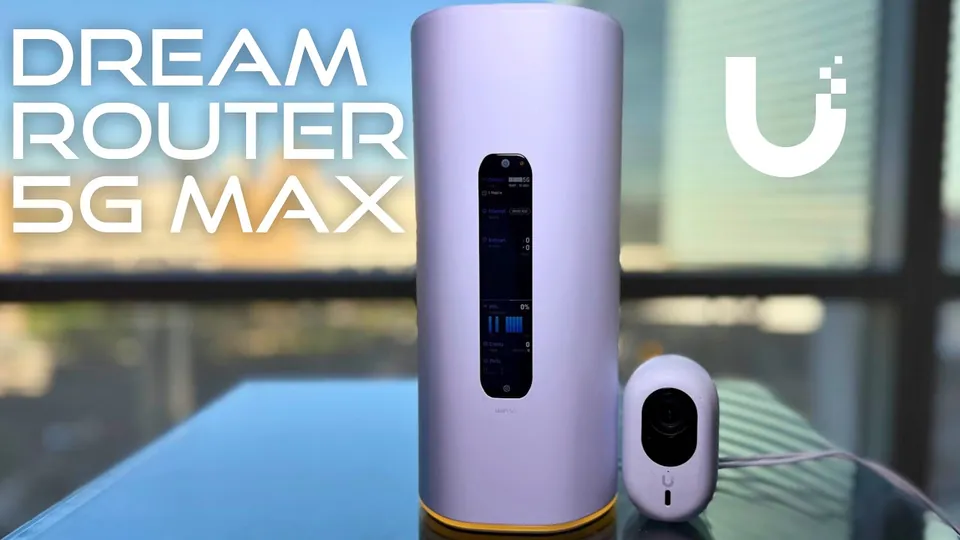
What happens if you take a UniFi Dream Router 7 and a 5G Max and they have a baby? You get the long-teased Dream Router 5G Max: a Wi-Fi 7 router with built-in 5G, a touchscreen, and the full UniFi OS app stack. It was so close to being perfect, Ubiquiti. So close.
I unboxed it, answered the question I get on every cellular UniFi product, whether you can set it up with nothing but a SIM card (yes, and it is seamless), then took it on the road to Las Vegas as my mobile command center, complete with a Protect camera in the hotel room. My one big complaint is camera capacity.
Prefer to watch? The full video is right here. 16:25 · Watch on YouTube
Jump to a section in the video
What's in the box and the hardware
In the box you get the usual 5G getting started information, a power supply and cable with a barrel jack (not USB-C), a nice braided Ethernet cable, a Ubiquiti-branded SIM ejector tool, and reading material.
Dream Router 5G Max hardware
| Feature | Details |
|---|---|
| Front display | 4.7 inch touchscreen |
| Wi-Fi | Wi-Fi 7, built-in access point |
| Cellular | 5G, two nano SIM slots, eSIM setup option |
| Ethernet | Four 2.5GbE ports |
| PoE out | One PoE port, 15.4 W |
| Fiber | 10G SFP port on the bottom |
| Power | 54 V barrel input |
| Storage | microSD slot, ships with a 64GB Western Digital Purple card |
There is also an LED on the bottom, which the UDR 7 doesn't have, and a rubbery grip around the base. Next to the UDR 7 it is taller but a tiny bit thinner.
Setting it up with only a 5G SIM
My T-Mobile 5G SIM was deployed at a site, so I picked up a new one for testing. Pop out SIM slot 1 with the ejector tool and insert the SIM. It goes in the way you think it does, after the usual two wrong tries.
On boot, the screen offered to insert a SIM or set up an eSIM, listed Verizon, AT&T and T-Mobile as local carriers, and showed a QR code for the UniFi app. That is a really good use of the screen.
Then the real test: no wired network, no internet, just the SIM. The app found the new device, I named it, set a password, and it set up UniFi OS over cellular. Setup complete. It is about time.
Speed test and the touchscreen
Out of the box, indoors, away from a window, in a heavily insulated area, I got a 35 ms ping, 191 Mbps down and only 1.5 Mbps up. My iPhone was showing two bars out of four, so I expected a weak result there. The dashboard read T-Mobile at -105 dBm, with WAN failover active even though it went straight to cellular.
Over Wi-Fi from my phone sitting right next to it, a speed test hit 315 Mbps down, and I could watch it in real time on the dashboard.
The touchscreen shows cellular info including the IMEI and SIM 2 slot, speed test results, live network activity, Wi-Fi, clients and ports. Settings let you change screen brightness, the bottom LED color and fan speed, and shut down or restart. At idle it was using 5% CPU and 52% of its memory.
Protect, Access and a camera on the road
Because it is a Dream Router, it runs the apps. I installed Protect and Access from the control plane. My UniFi desk phone powered right up from the PoE port, and I could have installed Talk too.
I factory reset my G4 Instant, adopted it to Protect over Wi-Fi and set it to high quality. Viewed remotely over 5G it was a little sluggish. Once I switched to the local network, it was near real time.
My favorite use case: the hotel room
I travel a lot, as a YouTuber, as a consultant and for fun, and hotel Wi-Fi is terrible. 5G usually isn't. With this, I connect to 5G, all my devices join my own Wi-Fi like with a travel router, except the cellular is built in.
Because it runs Protect, I can have a wireless camera recording in my hotel room, which matters when I am traveling with cameras, laptops, editing headsets and hard drives. In Vegas, during certain conventions, people sometimes break into hotel rooms. With full UniFi OS, notifications and footage can back up to the cloud. That puts some strain on the 5G, so get a SIM with a big enough plan. I used a 30 gig plan and it was fantastic. Set the night screen settings, because the screen and the bottom light get a little bright when you are trying to sleep.
“This is going to be phenomenal as a mobile command center for folks that are doing consulting, IT, construction, events.”
The difference showed up on that trip. The hotel Wi-Fi was mediocre at best. I edited and uploaded a video from my hotel room, and on hotel Wi-Fi it took about 4 hours to finish uploading. The UDR 5G Max performed like a champ: plug it in, and everything connects.
Fan noise
I couldn't get the fan to make any audible noise in normal use. Forcing it to 100% from the screen, it sounds like a small handheld fan or the fan in the back of a computer. For everything I threw at it, I never heard it once.
The catch: camera capacity
Protect on the UDR 5G Max can only manage one 4K camera, two at 2K, or up to five in HD. In a hotel room, one or two cameras are more than enough. But for a small office that wants a couple of cameras outside and one inside, you are already past the limit.
Bottom line
The UniFi Dream Router 5G Max is $499 and a great fit for consultants, IT pros, construction sites, events and small offices that want the full UniFi stack with built-in 5G as a primary or backup connection. It is a little bulky for travel. People already carry a UCG Fiber and a 5G Max to hotels, so I am not the only one. For the next generation, I want it smaller, maybe USB-C powered, with room for a couple more cameras and more storage. Until then, this is the closest thing to a UniFi 5G hotspot I have used.
Gear in this story
- Dream Router 5G MaxSpecs and compare for Dream Router 5G MaxUbiquiti Store (opens in a new tab)
- Camera G4 InstantSpecs and compare for Camera G4 InstantUbiquiti Store (opens in a new tab)
- Dream Router 7Specs and compare for Dream Router 7Ubiquiti Store (opens in a new tab)
- UniFi 5G MaxSpecs and compare for UniFi 5G MaxUbiquiti Store (opens in a new tab)
- Cloud Gateway FiberSpecs and compare for Cloud Gateway FiberUbiquiti Store (opens in a new tab)
Ubiquiti Store links are affiliate links. If you buy through them, the channel may get a small commission at no extra cost to you. Affiliate disclosure
Related stories
Ubiquiti at ISC West: UDM Beast, G6 Edge cameras, smoke alarms and more
Mar 25, 2026 · 4 min read
The easiest way to get started with UniFi Protect: the UNVR Instant
Sep 10, 2025 · 4 min read
UniFi G6 Bullet, Turret and Instant review: 4K across the board, tested against G5, G4 and AI Pro
Mar 24, 2025 · 6 min read
Jesse Nowlin
Founder of TABGEEKS, former IT Director and Google Developer Expert. I test networking and pro tech on real job sites, then write up what I find.
Join the community