

I bought Apple's HomeView: setup, widgets, AirPlay and the missing Siri timer
I bought Apple's new 7-inch HomeView myself, unboxed it, set it up and tried the widgets, AirPlay and Home controls. Siri can't set a timer on it yet.

Jesse Nowlin
Founder, TABGEEKS · · 5 min read
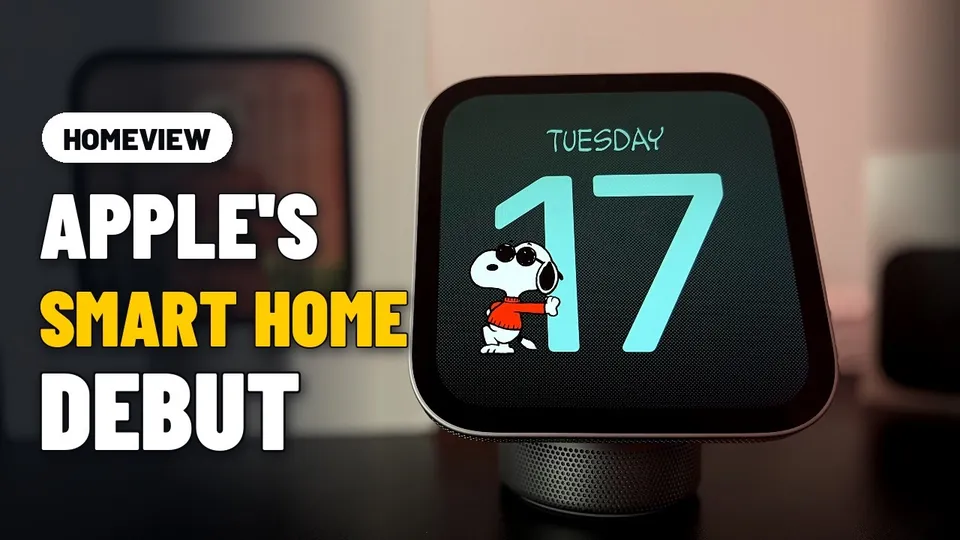
Apple finally has a proper smart home hub. HomeView is a 7-inch tabletop or wall-mounted display, and I bought it myself, so this is not a sponsored video. This is my first look: I unboxed it, set it up, and tried the widgets, AirPlay and Home controls. I will go much deeper in later videos.
The short version: it is a lovely piece of hardware, and right now Siri on it cannot set a timer. It needs another software update first.
Prefer to watch? The full video is right here. 18:12 · Watch on YouTube
Jump to a section in the video
Why I care about this one
I have been in smart home assistants since Amazon's Alexa shook things up a little over ten years ago. I was at Google I/O when the Google Assistant was announced, and since then I have owned the Hubs, the Maxes, the Hub Maxes, the SmartThings gear and the Dots. They were rebooted so many times that mine eventually broke and I gave up. Google's docked tablet display was supposed to be a home hub, but its permissions were all wrong for a busy family with little kids, and a detachable tablet was not rugged enough.
I am a tech fan, not just an Apple fan. I run an Apple Watch, AirPods, a MacBook Pro and a Mac mini, and I am also a Google Developer Expert and a fan of what Amazon pioneered here. I have Google's rebooted speaker with Gemini and Amazon's rebooted Alexa speaker too, and I plan to cover them all.
What Apple built
It feels premium: metal, solid, adjustable by hand, and small. HomeView has a 7-inch Liquid Retina display at 1088 x 1088 and an A18 chip. There is a 12MP Center Stage camera that follows you around the room, and it does not rotate on its own, only up and down when you move it. Underneath are full-range drivers, a down-firing woofer and force-cancelling passive radiators. Four far-field microphones pick you up wherever you stand, and they can also recognize smoke and CO alarm sounds. I could not test that in the video. Connectivity is Wi-Fi 6E, Bluetooth 6.0 and Thread, and there is a built-in temperature and humidity sensor. The price is $299 for the tabletop or wall-mounted model.
The software looks like a mix of Apple Watch, a home operating system and the Liquid Glass design from visionOS. The widgets look a lot like the glass widgets on the wall in Vision Pro, and the hardware is built to match.
The wall-mounted version drops the base. It can be powered over USB-C or power over Ethernet and mounted straight to the wall. That matters for higher-end smart homes, which mostly use iPads right now. IPad batteries swell over time, and in a wall nobody maintains, that is a fire risk. I would love a bigger version for that use.
In the box
You get Apple's braided USB-C to USB-C cable, roughly 5 feet long, plus a 30W USB-C power adapter, a medical device interference sheet, a one-year limited warranty and a short getting-started guide. Apple does include a power brick this time. My first attempt failed with a not enough power message because I plugged it into a desk dock instead. Use the brick, or at least a charger that can supply about 30 watts.
Setup and the one-hour update
Setup is simple: plug it in, hold your iPhone nearby, tap Set Up, and it pairs the way an Apple Watch does. Then it asks for a software update. That update took a little over an hour, from downloading through preparing and verifying.
After that I went through the prompts. It offered to build a photo face from my people and pets albums, but that needs iCloud Photos, which I do not use. That is how Apple nudges you toward its paid service, so I skipped it for now. I turned on home location and services, because smart home control is the entire reason I wanted this, and I said no to improving Siri. Then it learns your voice by having you read a few phrases aloud, and learns your face by having you turn your head in front of the camera.
Using it
Swipe down from the top for Control Center, with brightness, volume, Wi-Fi and more. Swipe up from the bottom for the app drawer. These are Apple's own apps, and any app that works with CarPlay, such as Spotify, runs here too. There is no App Store to download apps natively. You can AirPlay video or audio straight to it from your phone, which my kids will love.
Settings include automatic updates, with no beta option, and display options where True Tone gets turned off. You can add other people and choose what it does for unrecognized people, and you can restrict Safari, which matters with kids at home. My Apple Home accessories showed up automatically, and I turned my Nanoleaf lights off and on from the screen. There is also an intercom to announce dinner to every HomePod in the house.
The speakers are not full-size bass, but for a kitchen they are respectable. I would say they pass muster. Spotify pulled over from my phone, and the music also showed up as playing on my phone.
Widgets
Tap and hold to customize. Home Modular lets you pick the layout and which widgets show, and you can fill it with calendar, clocks, weather, photos, podcasts, music, smart home controls and more. Any app that already has widgets on Mac or iPhone looks like it can show them here, which is a huge number of apps. I like seeing an Amazon delivery or the date at a glance, and I wish I could fit six or more widgets. Some third-party widgets need work. The Amazon widget opened amazon.com logged out, and one app showed as unavailable. First-party apps like Weather work fine.
I also played a YouTube video through Safari directly on the device, with no AirPlay. At the breakfast table, that is plenty.
Where it falls short today
Then came the timer. I asked Siri for a 60-second timer and it said it could not set one because the system needed an update, right after an hour-long update. It said the same thing every time I tried. It could tell me the time, which was about the only thing it managed. For what is basically a kitchen display assistant, a timer is the one thing Siri is good at on every other platform.
This is a brand-new product, it came out on Friday, and it feels raw and early. I expect Apple to fix this soon. The iPhone Duo has already had a couple of updates in the two weeks since it launched.
What's next
I will keep testing and move it into the kitchen and other shared spaces in my home. I want to see what my seven-year-old and nine-year-old think of it compared with the Google Home sitting on the counter. More smart home videos are coming, including Google's new speaker with Gemini and Amazon's new Alexa speaker. Questions are welcome in the comments, and I will try to answer them in a deeper review.
Gear in this story
- Apple HomeViewapple.com (opens in a new tab)
Some of these store links are affiliate links. If you buy through them, the channel may get a small commission at no extra cost to you. Affiliate disclosure
Related stories
RingConn Gen 3 review: a smart ring with no subscription
Nov 13, 2026 · 4 min read

The best super thin iPhone Duo cases so far: ZAGG, ThinBorne, SmallRig, PITAKA and TORRAS
Nov 12, 2026 · 3 min read

First look: the thinner, lighter touchscreen MacBook Pro 14 with M5 Pro
Nov 8, 2026 · 5 min read
Jesse Nowlin
Founder of TABGEEKS, former IT Director and Google Developer Expert. I test networking and pro tech on real job sites, then write up what I find.
Join the community