

Home / Stories / UniFi + Networking
UniFi 5G Max hands-on: read this before you buy one
The UniFi 5G Max is the start of Ubiquiti's new 5G lineup. I unboxed it, hit a SIM card problem you should know about, ran speed tests on T-Mobile and cover the rest of the lineup.

Jesse Nowlin
Founder, TABGEEKS · · 4 min read
Ubiquiti just took the wraps off its new 5G lineup, and the 5G Max is where it starts. There's also a rugged 5G Max Outdoor and a UDR 5G Max, an all-in-one Dream Router with 5G and storage that can run all the apps, which I can't wait to get my hands on. Note these aren't the UMR models, which are still 4G LTE.
I unboxed the 5G Max, set it up on my network, ran into a SIM card problem that's worth knowing about before you buy, and tested speeds on T-Mobile from my studio desk.
The bottom line: once I had the right SIM, it worked great, and it's a deeply integrated way to add cellular failover, or even primary internet, to a UniFi network. Just know it needs a UniFi gateway.
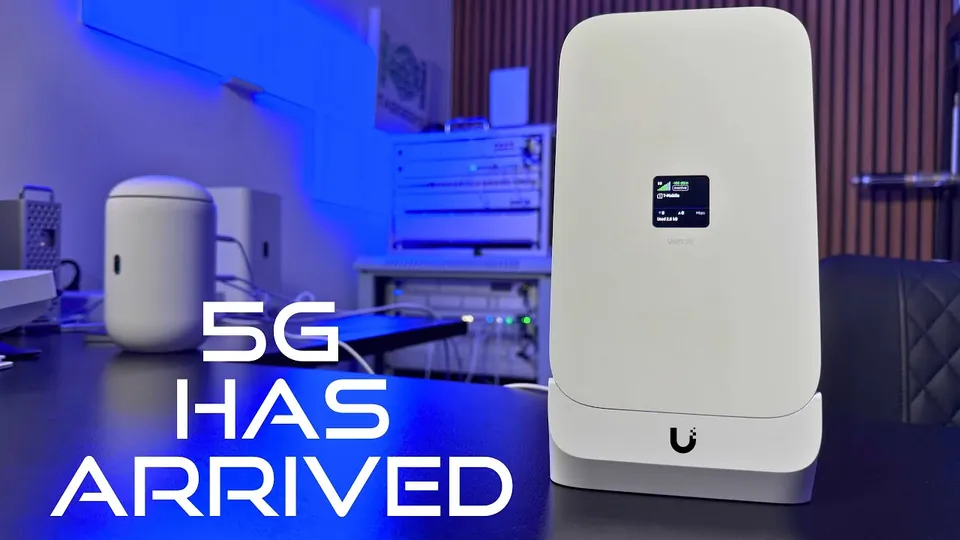
Prefer to watch? The full video is right here. 13:20 · Watch on YouTube
Jump to a section in the video
What's in the box
On the bottom of the device are a PoE in 2.5 GbE port, two SIM slots and a reset hole, plus two docking points that the stands clip onto. The back is plastic with vents at the top and bottom. The box claims 3.4 GB download performance, sub-6 GHz support, eSIM compatibility and dual SIM automatic failover.
For what I think is the first time, Ubiquiti includes a branded SIM ejection tool. It's nice and hefty, like their wrench, though it's still pointy, so it's not going on my keychain. You also get a slanted desk stand with a rubbery grip and cable pass-through, a window mount with sticky strips plus spares, a screw-in wall mount, a mounting template and a small pack of screws. Everything clicks in and out without a security key.
Put it where the signal is
This is the important part. You don't have to plug the 5G Max into your rack or an ISP port. Plug it into any PoE switch on your network, and it powers up and provides internet all the way back to your gateway. If the best cellular reception is by a window across the building, put it on a switch over there.
It also has a touchscreen. You can see SIM slot status, data usage, throughput, IP address, IMEI, uptime and hardware revision, change the color and brightness and restart it, right from the device.
The SIM card gotcha
My phone's T-Mobile SIM didn't work. It turns out T-Mobile changed the rules at some point: you can't just move a phone SIM into a data device anymore. I used to do that all the time between phones, tablets and hotspots. I had to go to T-Mobile and get an actual data plan SIM. Not the tablet plan, just the data plan. Mine is 25 GB a month. With that SIM in, everything worked.
“After all of the trials and tests that I did, when I put in the right SIM card for it, then poof, it worked, no problem.”
Speed test
I ran it on my Dream Router 7, plugged into its PoE port, at my desk, surrounded by stuff blocking a lot of the signal. It showed up as WAN 3, T-Mobile USA, at -96 dBm, which is mediocre reception. Closer to -45 would be good.
I pulled the main ISP line, and it cut over in about a second. When I first tested it I got about 300 to 350 Mbps down. This run ramped up past 200 Mbps. As with anything cellular, it'll vary, and moving closer to a window might help. Upload isn't wonderful, which is cellular in general. Round trip time settled around 25 to 60 ms, which is not bad over cellular, and pages loaded instantly.
Settings and topology
In UniFi Network you see SIM 1 as primary with its signal and carrier, SIM 2 and eSIM activation, device version, uptime, insights and system stats. Per-connection settings include data limits and APN. If you travel internationally and the APN doesn't autodetect, that's where you enter it. Locate makes the Ubiquiti logo blink, which is cute.
The topology shows the T-Mobile WAN active on the Dream Router, coming from the 5G Max. Put the two together and that's essentially the new UDR 5G Max. I can see myself taking this on the road for a mobile office or a shoot.
It is not a standalone router
I know this will come up: you cannot use the 5G Max by itself. It must be adopted by a UniFi gateway, like a UDM Pro, a Dream Router or a smaller one like the Cloud Gateway Fiber. On its own, it won't do anything.
The 5G lineup at launch
| Device | Price at launch | Availability |
|---|---|---|
| 5G Max | $399 | Available at launch |
| 5G Max Outdoor | Under $500 | January |
| UDR 5G Max | Under $600 | February |
As announced in December 2025. All three are unlocked. T-Mobile and AT&T worked at launch, with Verizon support expected December 29, subject to change.
Bottom line
The 5G Max is a well-designed, easy-to-adopt way to add cellular to a UniFi network, as failover or even as primary internet in places that don't have great options. The PoE placement flexibility is the killer feature. Just bring a data-only SIM, and make sure you already have a UniFi gateway.
Gear in this story
- Dream Router 5G MaxSpecs and compare for Dream Router 5G MaxUbiquiti Store (opens in a new tab)
- UniFi 5G MaxSpecs and compare for UniFi 5G MaxUbiquiti Store (opens in a new tab)
- Dream Machine ProSpecs and compare for Dream Machine ProUbiquiti Store (opens in a new tab)
- UniFi 5G Max OutdoorSpecs and compare for UniFi 5G Max OutdoorUbiquiti Store (opens in a new tab)
- Dream Router 7Specs and compare for Dream Router 7Ubiquiti Store (opens in a new tab)
- Cloud Gateway FiberSpecs and compare for Cloud Gateway FiberUbiquiti Store (opens in a new tab)
Ubiquiti Store links are affiliate links. If you buy through them, the channel may get a small commission at no extra cost to you. Affiliate disclosure
Related stories

Ubiquiti's surprise holiday sale: the UniFi deals I picked out
Dec 10, 2025 · 3 min read
UniFi Dream Machine Beast: the N2 processor makes it next generation
Apr 30, 2026 · 4 min read

Ubiquiti at ISC West: UDM Beast, G6 Edge cameras, smoke alarms and more
Mar 25, 2026 · 4 min read
Jesse Nowlin
Founder of TABGEEKS, former IT Director and Google Developer Expert. I test networking and pro tech on real job sites, then write up what I find.
Join the community