

XREAL Neo: a $99 battery pack that also plays your Switch on AR glasses
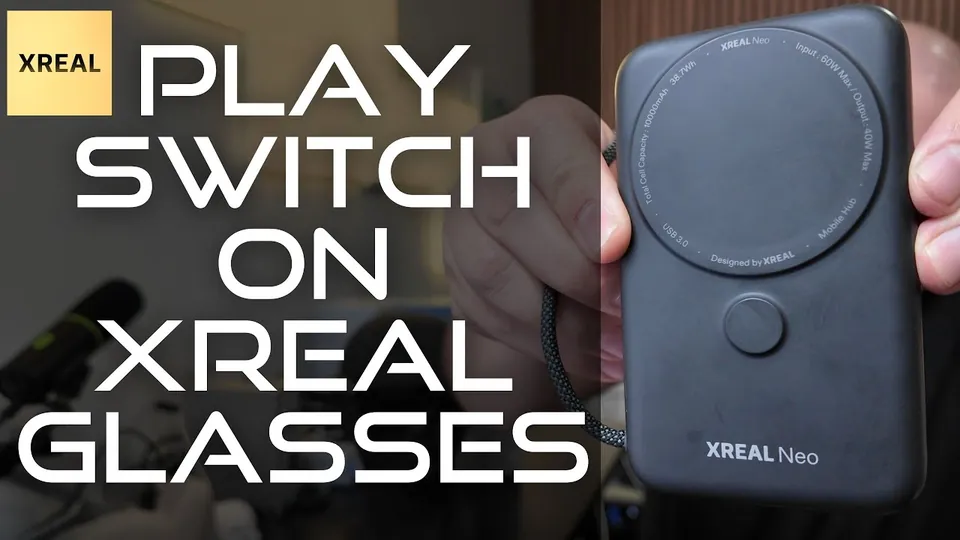
The XREAL Neo looks like a battery pack, and it is one. Its party trick is video pass-through: plug in your XREAL glasses and a Nintendo Switch, and you play on a giant virtual screen while it powers everything.

Jesse Nowlin
Founder, TABGEEKS · · 3 min read
I got early hands-on time with the XREAL Neo at AWE in Long Beach, and now it is out and available. At first glance it is a battery pack. We have all seen those. But charging your stuff is not the magical party trick that makes it valuable for XREAL owners.
Plug your XREAL glasses into the glasses port, plug the Neo's USB-C cable into a Nintendo Switch or another device, and it powers the device while passing video through to your glasses. That means you can play a Switch, including the Switch 2, on glasses like my XREAL One Pro. It costs $99, and it is going straight into my everyday carry.
Prefer to watch? The full video is right here. 7:09 · Watch on YouTube
Jump to a section in the video
The specs
The specs are printed around the ring. There were some questions about the output when it was announced on stage, and those are now settled. XREAL calls it a mobile hub.
XREAL Neo at a glance
| Spec | As stated |
|---|---|
| Cell capacity | 10,000 mAh |
| Max input | 60 W |
| Max output | 40 W |
| Connection | USB 3.0 |
| Magnets | Magnetic attach, no wireless charging |
| Extras | Rotating kickstand, metal ring adapter |
| Price | $99 at launch |
A tour of the hardware
The front is magnetic, so it snaps onto the back of an iPhone 17 Pro Max. One important note: it does not wirelessly charge your phone. It holds on magnetically, and you use the cable to charge or pass video through.
On one side is the glasses port and the attached USB-C cable that goes to your streaming device, whether that is a Switch or a computer. The cable docks neatly into a slot so it doubles as a carrying loop. The other side has the charging input, marked with a lightning bolt. You can charge the Neo while it powers your glasses and your device at the same time. There is a power button and LED battery indicators on one end.
On the back is a metal clip that flips out into a kickstand. It holds your phone or console upright, and it rotates so you can stand a device sideways while you play. It is a little more awkward on its side if you are also charging, because the cable gets in the way, but it works.
What about a Switch, which has no magnets? The Neo comes with a metal ring with an adhesive back. Stick it on the back of your console and the Neo attaches magnetically, kickstand and all.
Playing Zelda on a 200 inch screen
For the real-world test, I plugged the Neo into a Switch running The Legend of Zelda, and the console started charging right away. The Switch screen went dark, the glasses turned on, and the game came up in the glasses. I set the virtual screen to a huge 200 inches and switched from follow mode to anchor mode so it stayed put.
At 200 inches it was actually too big to see the whole screen at once, so I dialed the size down after recentering. Once adjusted, the verdict from the person playing was clear. It was better than the Switch screen, better than the big TV, and they wanted to play that way a lot.
“This has been a long time coming.”
Bottom line
For $99, the XREAL Neo solves the biggest headache for AR glasses gamers: keeping everything powered while playing on a giant virtual screen. I am taking it on a flight tomorrow morning. The kickstand alone makes it useful on a plane tray, and a battery that can charge while it charges my devices is excellent. If you own XREAL glasses and a Switch, this is an easy recommendation.
Gear in this story
- XREAL Neo
- XREAL One Pro
- Nintendo Switch 2
Ubiquiti Store links are affiliate links. If you buy through them, the channel may get a small commission at no extra cost to you. Affiliate disclosure
Related stories
Hands-on with the new Meta Ray-Ban Gen 3: Aviators, a camera-free option and a smaller camera
Sep 25, 2026 · 4 min read
Unboxing XREAL Aura: Android XR in a case that fits your backpack
Jun 24, 2026 · 5 min read
XREAL's Project Aura, X1S chip, Neo battery and Enterprise push: my interview with Ralph
Jun 12, 2025 · 4 min read
Jesse Nowlin
Founder of TABGEEKS, former IT Director and Google Developer Expert. I test networking and pro tech on real job sites, then write up what I find.
Join the community