

Home / Stories / UniFi + Networking
UniFi Doorbell Lite vs G4 Doorbell Pro: is the $99 doorbell good enough?
Ubiquiti's Doorbell Lite costs $99 and runs on PoE. I rigged one up next to my G4 Doorbell Pro, set it up in Protect, and was surprised by how well it held up at night.

Jesse Nowlin
Founder, TABGEEKS · · 4 min read
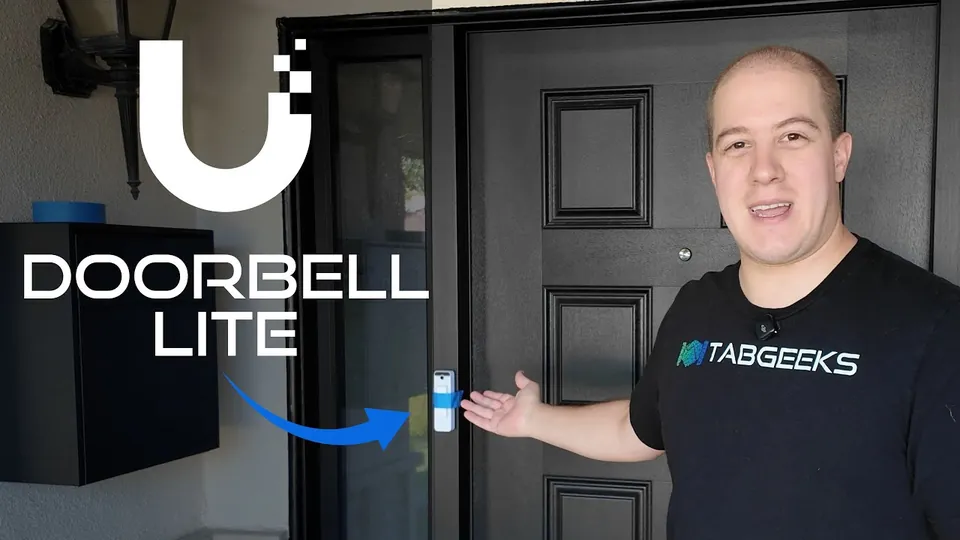
I just got my hands on Ubiquiti's new $99 Doorbell Lite, and I wanted to put it up against the G4 Doorbell Pro I have had for a long time. There was one problem: I also just got a brand new front door, and there is no way I am drilling into it yet.
So this is one of the hokiest, hackiest, wackiest installs I have ever done. But once it was running, the Doorbell Lite impressed me, especially at night. For a $99 camera, it is a solid doorbell.
Prefer to watch? The full video is right here. 12:56 · Watch on YouTube
Jump to a section in the video
Why I wanted to switch
My G4 Doorbell Pro has two problems. It is not PoE; it is powered by low voltage doorbell wiring. And it is Wi-Fi only, with no Ethernet cable running to it. I have also never liked its angle. It points away from the street instead of toward it, so I wanted the new doorbell on the door itself, where it belongs.
The new door made that tricky. It has glass panels on both sides instead of the solid wood I expected, a new mailbox sits right where I planned to mount it, and the floor is stone, so I need to figure out conduit that does not look terrible. Until I solve that, the Doorbell Lite is going up temporarily.
The temporary install: a tripod mount and blue tape
My first attempt used the doorbell's security screw hole as a tripod thread and clamped the whole thing to the door. It worked, but it was angled. So I went with a friend of the trades: blue tape. It is versatile, cheap and does not leave a mark. I taped the doorbell along the edge of the door and ran Ethernet from one of my outdoor network junctions.
I terminated both ends T568B with pass-through connectors. Yes, I know some of you do not like pass-throughs. Deal with it. Plugged in, the Doorbell Lite powered right up over PoE.
Setting it up in UniFi Protect
The Protect app found it right away as a new device. Tap to adopt, and you can pair indoor chimes during setup, which I did. Once online, it was running at 24 FPS, and I set recording to always, with motion and AI events turned on, frame rate up to 24 and high video compression quality.
Since it faces the street, I will likely need a motion zone so it ignores passing cars and only picks up people approaching the door. I also ran the firmware update while I was in there.
Daytime: a tall view, but no package camera
The first difference you notice is shape. The G4 Pro records a widescreen 16:9 image. The Doorbell Lite is tall, with a 4:3 aspect ratio. Walking up to the house, it caught me approaching and pressing the button, and the chime is loud.
The G4 Pro has a second camera pointing straight down, so I can check whether my Amazon packages are on the porch. The Lite does not. To test what it can see below, I put my Milwaukee Packout toolbox in front of the door. The feed showed just the edge of the toolbox, about a foot and a half from the door. It does see downward reasonably well, but it will not see anything directly up against the door.
Doorbell Lite vs G4 Doorbell Pro
| Doorbell Lite | G4 Doorbell Pro | |
|---|---|---|
| Price | $99 | Not covered |
| Power and network | PoE | Low voltage doorbell wiring, Wi-Fi only |
| Aspect ratio | 4:3, tall | 16:9, widescreen |
| Package camera | No, blind spot about 1.5 ft from the door | Yes, second downward camera |
Based on my setup. Price at the time of recording.
Night vision surprised me
I turned off the G4 Doorbell Pro's IR emitters so they would not interfere. With the porch lights on, in high quality mode, the Lite picked up detail well into the darkness.
Then I turned the porch lights off to see what its own IR could do. You could see all the way out to the street and anyone walking up the path, and with the lights off you could actually see people better than with them on. The only other light was a street light. I caught what looked like a person walking in the distance. You could not see faces that far out, but the image looked really nice. On a very foggy night, the image stayed crisp until it tapered off into the fog.
“Overall, it's just a solid camera. And what more can you ask from a $99 camera?”
Bottom line
Does the Doorbell Lite have every feature of the G4 Doorbell Pro? No. There is no downward-facing package camera, and the 4:3 frame takes some getting used to. But it has a pretty good downward field of view, solid colors and solid night vision, and it runs on a single PoE cable. For $99, I have been very impressed.
If you need more doorbell, Ubiquiti showed the G6 Entry lineup, standard and Pro, at the Ubiquiti World Conference in Miami, and it was slated for Q4 2025. As for my door, the household vetoed a permanent install until I find a better solution, so that is a project for another day.
Gear in this story
- Doorbell LiteSpecs and compare for Doorbell LiteUbiquiti Store (opens in a new tab)
- UniFi G4 Doorbell ProSpecs and compare for UniFi G4 Doorbell ProUbiquiti Store (opens in a new tab)
- Reader G6 EntrySpecs and compare for Reader G6 EntryUbiquiti Store (opens in a new tab)
Ubiquiti Store links are affiliate links. If you buy through them, the channel may get a small commission at no extra cost to you. Affiliate disclosure
Related stories

Ubiquiti World Conference Miami 2025: everything I'm allowed to share
Nov 6, 2025 · 4 min read
Did Ubiquiti perfect the doorbell? G6 Pro Entry, G6 Entry and Doorbell Lite
Sep 3, 2025 · 3 min read

UniFi AI Port: adding face and plate recognition to older cameras
Dec 12, 2024 · 4 min read
Jesse Nowlin
Founder of TABGEEKS, former IT Director and Google Developer Expert. I test networking and pro tech on real job sites, then write up what I find.
Join the community