

Home / Stories / UniFi + Networking
UniFi Device Bridge Switch: a wireless PoE switch with Wi-Fi 7 and a 10G port
The Device Bridge Switch connects to your network over a Wi-Fi 7 backbone and powers wired gear from eight PoE+ ports, one of them 10G. I tested it with my Mac mini and hit a gigabit down, wirelessly.

Jesse Nowlin
Founder, TABGEEKS · · 3 min read
The Device Bridge Switch is one we have seen leaked at a bunch of shows, and it has a screen on the front. Like the rest of the Device Bridge family, it uplinks to your network over Wi-Fi. Its new party trick is that every port is PoE: seven 2.5 gig PoE+ ports and one 10 gig PoE+ port, with up to 185 W to go around.
I plugged my Mac mini, which runs all my shows and production and has a 10 gig NIC, into the 10 gig port and ran speed tests over the Wi-Fi 7 backhaul. It hit a gigabit down. For $299, it solves a problem I have run into at real client sites.
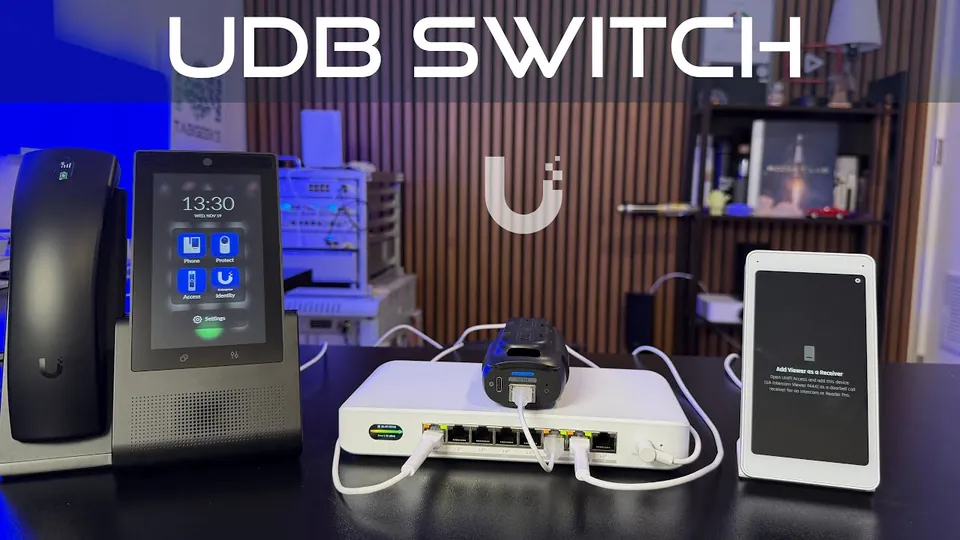
Prefer to watch? The full video is right here. 6:06 · Watch on YouTube
Jump to a section in the video
The problem this would have solved
I had a client with a big open space in the middle of the floor. They filled it with beautiful desks and figured the floor power outlets were enough. There was no network there. We looked at options, including dropping cable from the ceiling, and they didn't like any of them. We ended up running cable covers across the floor. They hated it, and eventually the desk area got turned into something else.
Those desks had computers, desk phones and a printer, and none of it was Wi-Fi. With this switch, one box at the desks could have powered everything and pulled its network from the Wi-Fi that was already in the space.
Device Bridge Switch at a glance
| Spec | As stated |
|---|---|
| Ports | 7 x 2.5 GbE PoE+, 1 x 10 GbE PoE+ |
| PoE capacity | Up to 185 W |
| Uplink | Wi-Fi 7, 6 GHz support |
| Included power adapter | 60 W (210 W adapter supported) |
| Display | Front screen with signal, throughput and port status |
| Price | $299 at launch |
In the box and on the screen
The box has a mounting template, a mounting piece, screws and reading material, with the install guide printed outside. Up front are the screen, power and reset.
The screen showed a good signal of minus 40 dBm on channel 85, which is 6 GHz, meshing directly to the U7 Pro Wall on my rack. In the UniFi app you get per-port configuration through the port manager, including toggling ports and power cycling PoE, plus Wi-Fi retries, PoE power in use, connected clients, uptime, the parent device and air stats.
Speed test: a gigabit over Wi-Fi
With the Mac mini on the 10 gig port, the first test climbed from 500 Mbps to 800, 900, 960 and then hit 1 Gbps down, with about 500 Mbps up. I turned off the Mac's own Wi-Fi and ran it again to be sure: a consistent 1 Gbps down and 250 to 300 Mbps up. Send and receive on the link showed over 4 Gbps. All of that over the air.
“Again, that is coming down over this device here and it's connected into the 10 gig NIC and that is over Wi-Fi. That is phenomenal.”
Power budget and what it can run
The box includes a 60 W adapter, not the 210 W one. In settings you tell the switch which external adapter you have. With the bigger adapter, which comes with some enterprise gear or can be bought separately, you can push a lot more power through it.
Keep in mind these are PoE+ ports, not PoE++, so something like the UNAS 2 would need an inline injector. But a Ubiquiti desk phone, a casting device and an intercom viewer all ran off it at once with power to spare.
Bottom line
I am looking forward to using this at restaurant and bar clients, where the register, POS and those annoying Ethernet-only receipt printers need to live wherever the counter is. Paired with the Device Bridge IoT, the Device Bridge Switch is an excellent addition to the lineup. It costs $299, and it is a fantastic device.
Gear in this story
- Device Bridge SwitchSpecs and compare for Device Bridge SwitchUbiquiti Store (opens in a new tab)
- Device Bridge IoTSpecs and compare for Device Bridge IoTUbiquiti Store (opens in a new tab)
- Access Point U7 Pro WallSpecs and compare for Access Point U7 Pro WallUbiquiti Store (opens in a new tab)
- UNAS 2Specs and compare for UNAS 2Ubiquiti Store (opens in a new tab)
Ubiquiti Store links are affiliate links. If you buy through them, the channel may get a small commission at no extra cost to you. Affiliate disclosure
Related stories

UniFi Device Bridge IoT review: a $49 fix for wired-only devices
Nov 20, 2025 · 3 min read

UniFi AI Port: adding face and plate recognition to older cameras
Dec 12, 2024 · 4 min read
How to connect Starlink V5 directly to a UniFi network, no router needed
Aug 3, 2026 · 4 min read
Jesse Nowlin
Founder of TABGEEKS, former IT Director and Google Developer Expert. I test networking and pro tech on real job sites, then write up what I find.
Join the community