

Home / Stories / UniFi + Networking
UniFi U7 In-Wall install: a slim Wi-Fi 7 AP for smaller rooms
A temporary access point at a community center finally got replaced with Ubiquiti's slim U7 In-Wall. It is thinner, has two 2.5 GbE ports including PoE out, and costs $149, but skips 6 GHz.

Jesse Nowlin
Founder, TABGEEKS · · 3 min read
This was supposed to be temporary, but as the old saying goes, there is nothing so permanent as temporary. The network drop at this community center was meant for a Protect Viewport and a screen to keep an eye on the cameras. They changed their minds about the screen, realized their Wi-Fi was weak there, and a temporary access point ended up hanging off the drop.
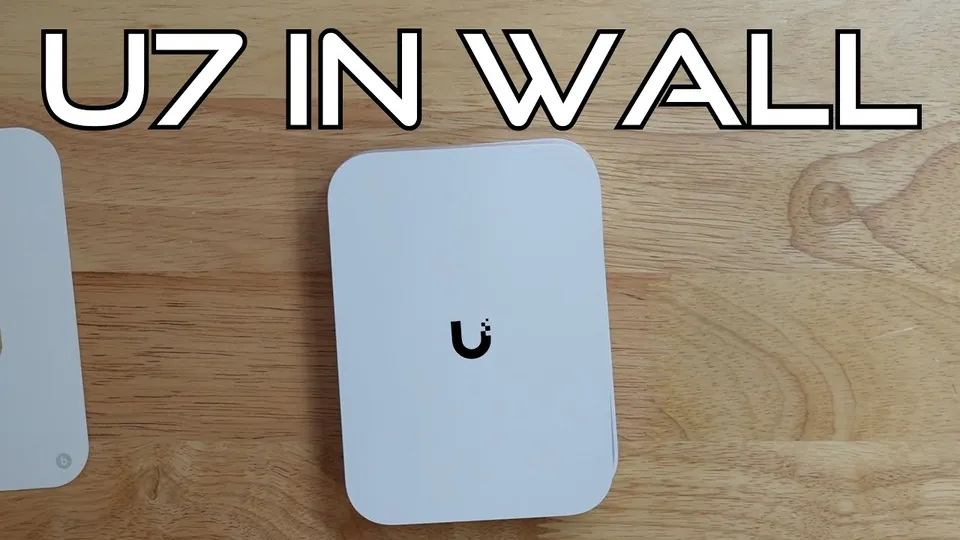
Today, that changes with the new U7 In-Wall, Ubiquiti's slim, wall-optimized Wi-Fi 7 access point for private rooms in hotels, offices and multi-unit residences. Ubiquiti sent it over to review.
Prefer to watch? The full video is right here. 6:16 · Watch on YouTube
Jump to a section in the video
A thinner, quieter design
It is thinner and sleeker than before. The bright light on the front is gone, replaced by a nice glowing little orb. The bottom drops from four ports to two, both 2.5 GbE, and one of them is PoE out. There is also the usual reset button, and the back has just the Ethernet jack.
It clicks onto its mounting plate once it is lined up correctly. To remove it, as before, use the security pin to pop the backing off.
Installation and size
I love how easy these are to install. It was a bit of a tight fit, but it worked. Next to the U7 Pro Wall, which is much bigger and sticks out farther from the wall, the U7 In-Wall is dwarfed. The U7 Pro Wall has vents, probably for passive cooling, and a single 2.5 GbE LAN port with no extra ports on the bottom.
Adoption was the usual: hit setup and it showed the model, IP address, MAC address, device version and uptime. A minute later, it was adopted.
Because of the PoE port on the bottom, if they ever want that Viewport after all, you just plug it into the U7 In-Wall and it comes to life. No extra drop needed.
About that Netgear network name
You'll notice the Wi-Fi name is still a Netgear network name. It is a long-running network that everybody has in their phones, with a bunch of devices configured for it, so when we switched to UniFi, nobody wanted to reset everything. My guess is that it dates back to their original Netgear router from around 2008. A Netgear Wi-Fi name running on Ubiquiti equipment. The irony is not lost on me.
In the UniFi dashboard
After two, almost three, days, it has been running great. Only a handful of devices use it at a time, which is the use case, and it will pick up more on weekends.
You can enable or disable each port, set link speed manually or apply an Ethernet port profile. I unplugged the Viewport since they aren't using it, so why waste the power? Insights show it automatically moved channels to optimize wireless performance, which is always appreciated. Settings include auto or manual transmit power, Wi-Fi options, LED on or off, locate, restart, disable and remove.
The catch: no 6 GHz
Ubiquiti's compare page on the store lets you check it against the previous generation U6 In-Wall and the U7 Pro Wall. The big thing to note is that the U7 In-Wall has no 6 GHz radio, so you can't take full advantage of Wi-Fi 7.
U7 In-Wall at a glance
| Spec | U7 In-Wall |
|---|---|
| Price | $149 |
| Ports | Two 2.5 GbE, one with PoE out |
| Radios | No 6 GHz |
| Clients | 200, per Ubiquiti's compare page |
| Max throughput | 4.3 Gbps, per Ubiquiti's compare page |
“For the price and the design, it is an excellent small area, high-speed capable access point.”
Bottom line
The U7 In-Wall costs $149. For a hotel room, office, apartment or a small community room like this one, it is a clean, easy install with plenty of speed and a handy PoE port for a nearby device. If you need 6 GHz, look at the U7 Pro Wall instead.
Gear in this story
- Access Point U7 In-WallSpecs and compare for Access Point U7 In-WallUbiquiti Store (opens in a new tab)
- Access Point U7 Pro WallSpecs and compare for Access Point U7 Pro WallUbiquiti Store (opens in a new tab)
- Protect ViewportSpecs and compare for Protect ViewportUbiquiti Store (opens in a new tab)
- Access Point U6 In-WallSpecs and compare for Access Point U6 In-WallUbiquiti Store (opens in a new tab)
Ubiquiti Store links are affiliate links. If you buy through them, the channel may get a small commission at no extra cost to you. Affiliate disclosure
Related stories

Ubiquiti's surprise holiday sale: the UniFi deals I picked out
Dec 10, 2025 · 3 min read
UniFi Cloud Gateway Fiber: the Cloud Gateway Max with 10G and PoE
Feb 25, 2025 · 4 min read

UniFi AI Port: adding face and plate recognition to older cameras
Dec 12, 2024 · 4 min read
Jesse Nowlin
Founder of TABGEEKS, former IT Director and Google Developer Expert. I test networking and pro tech on real job sites, then write up what I find.
Join the community