

Home / Stories / UniFi + Networking
UniFi UPS 2U review: a rackmount battery backup that lives in your UniFi console
Ubiquiti's new 2U rackmount UPS is the big brother to the tower model. I looked inside at the batteries, racked it, moved my studio network onto it and went through the UniFi software.

Jesse Nowlin
Founder, TABGEEKS · · 4 min read
Battery backups are one of the first things I bring into any rack I build, and until now that meant a CyberPower or another brand that sits outside the UniFi world. Ubiquiti's new UPS 2U changes that. It is the big brother to the tower model, rated at 1 kVA, with more batteries, and it shows up in UniFi Network like any other device.
I unboxed it on my live show, so this is the deeper look: inside the battery compartment, a tour of the back panel, racking it in the Toolless Mini Rack, moving my studio network onto it, and walking through the software. At $279, I am happy with the price and the capability, and I plan to stack my racks with them. It does have a couple of gaps.
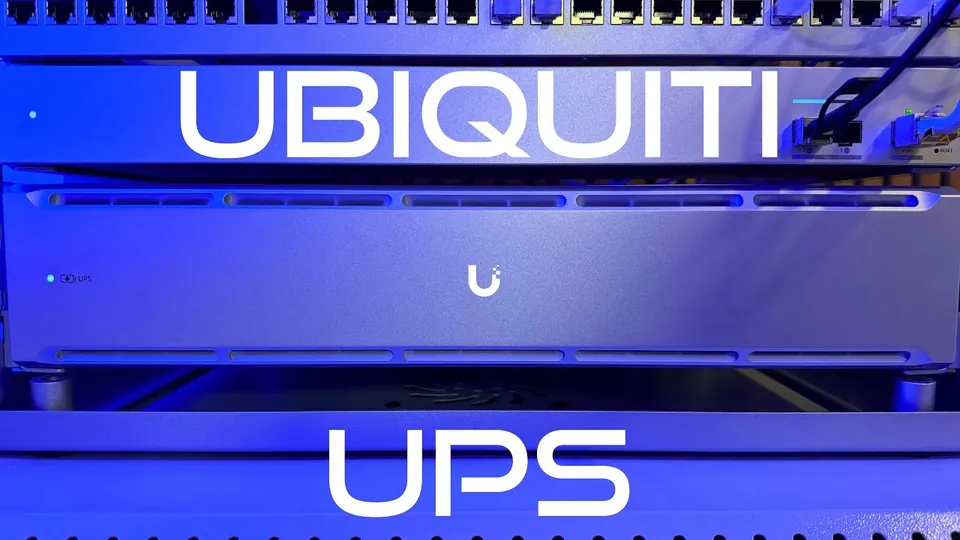
Prefer to watch? The full video is right here. 14:59 · Watch on YouTube
Jump to a section in the video
Inside: replaceable lead-acid batteries
It is heavy. On the front there is an LED status indicator and a front panel that pops off by pulling on small grooves, with clips that snap it back into place. Behind it is the battery compartment door. I used a power tool on the screws, which I don't recommend, but I'm the reviewer.
Inside, a tray slides out with two battery packs, each a 12 V, 9 amp lead-acid battery. They look relatively easy to replace, which matters, because anybody who has worked in IT or service knows you regularly replace UPS batteries. They are not lithium iron phosphate, and my guess, with no inside knowledge, is that a future pro model would bring beefier batteries and extra features like a front screen.
The back panel: watch the outlets
UPS 2U back panel
| Feature | Details |
|---|---|
| Power button | On the back, so people walking by can't press it |
| Management port | 1 GbE |
| Network surge | 1 GbE throughput port |
| Top outlet row | Surge plus battery |
| Bottom outlet row | Surge only |
| Power cable | About 6 ft |
The outlets are the thing to get right. Like the tower unit, only the top row is on battery. The bottom row is surge only. That is not like a lot of UPSes you may have used where every outlet is on battery, so don't make that mistake. Outside the US, your outlets will look different.
Racking it, and a CyberPower comparison
Before the swap, my studio stack ran on a CyberPower UPS. That stack includes two Dream Machine Pro Maxes, several switches including the WAN Switch, an NVR, a UNAS Pro and my modem. The CyberPower was outputting about 370 W with an estimated run time of 18 or 19 minutes. It is a tiny bit smaller than the Ubiquiti unit and more expensive. It does have a few extra features, and all of its outlets are on battery, but it doesn't have integrated network monitoring.
The Toolless Mini Rack made rearranging easy. I moved things up to free 2U, and since good practice puts the heaviest thing at the bottom, I moved the light WAN Switch out of the bottom slot. The UPS was a beautiful fit. If you aren't using the mini rack, the box includes hefty 2U rack ears, feet and Ubiquiti's own rack screws.
I left it unscrewed so I could reach the back, powered it on, moved everything onto the battery outlets, and connected the management port with one Ubiquiti cable to the network.
The UniFi software
After an update, the device panel shows the uplink, which outlets are on battery and which are surge only, surge in and out, and port speeds. My load read 38%, 380 W, which is in line with the CyberPower reading.
You can't turn individual outlets on and off as you can on the Power Distribution Pro, so if you rely on that, keep your PDU Pro. As far as I can tell, the software is the same as the tower version's.
Safe Shutdown pairing lets you click to pair the UPS with devices like a UDM Pro Max, UNAS or NVR, and at around 10% battery, I believe, it sends them the command to shut down safely. There is also a NUT server option, which shares the UPS status so third-party devices that support NUT can shut down safely during an imminent power failure.
You also get the model, connection, IP and MAC address, uptime, current, voltage and power factor, and the parent device it is plugged into. The analytics tab so far only shows online, offline and update events. I'd like to see wattage history there. Standard options include remote power off, which is handy before a storm, and a locate button that blinks the blue light on the front.
“I am very happy with both the price and the capability of this device.”
What's missing
I wish it had a screen on the front like the CyberPower, so I could tap it in the rack and see remaining run time, voltage and load. You can see all of that on your phone or laptop, so name your devices clearly by rack and location. Ubiquiti called this the beginning of a lineup, so I expect more powerful versions to follow.
Bottom line
The UniFi UPS 2U costs $279. For a UniFi rack, integrated monitoring, Safe Shutdown and NUT support beat managing a separate brand's UPS. Just remember which outlet row is on battery, and keep a PDU Pro if you need per-outlet control. I'm keeping this one in production and getting at least one or two more for my main rack.
Gear in this story
- Dream Machine Pro MaxSpecs and compare for Dream Machine Pro MaxUbiquiti Store (opens in a new tab)
- UPS 2USpecs and compare for UPS 2UUbiquiti Store (opens in a new tab)
- UPS TowerSpecs and compare for UPS TowerUbiquiti Store (opens in a new tab)
- Toolless Mini RackSpecs and compare for Toolless Mini RackUbiquiti Store (opens in a new tab)
- UniFi WAN SwitchSpecs and compare for UniFi WAN SwitchUbiquiti Store (opens in a new tab)
- Power Distribution ProSpecs and compare for Power Distribution ProUbiquiti Store (opens in a new tab)
- Switch Pro XG 10 PoESpecs and compare for Switch Pro XG 10 PoEUbiquiti Store (opens in a new tab)
- UNAS ProSpecs and compare for UNAS ProUbiquiti Store (opens in a new tab)
Ubiquiti Store links are affiliate links. If you buy through them, the channel may get a small commission at no extra cost to you. Affiliate disclosure
Related stories
How to connect Starlink V5 directly to a UniFi network, no router needed
Aug 3, 2026 · 4 min read
UniFi Dream Machine Beast: the N2 processor makes it next generation
Apr 30, 2026 · 4 min read

The $79 UniFi Travel Router is here, and it brings your cameras with you
Dec 23, 2025 · 4 min read
Jesse Nowlin
Founder of TABGEEKS, former IT Director and Google Developer Expert. I test networking and pro tech on real job sites, then write up what I find.
Join the community