

Home / Stories / UniFi + Networking
UniFi UPS Tower review: Ubiquiti finally makes a UPS, and safe shutdown works
The UPS Tower is Ubiquiti's first desktop battery backup, and it plugs right into the UniFi console. I adopted it, loaded it up, then pulled the plug to see whether it would safely shut down my UDM Pro Max.

Jesse Nowlin
Founder, TABGEEKS · · 5 min read
I have been hoping Ubiquiti would make a UPS for a very long time. Finally, here it is: the UniFi UPS Tower. Before recording, I had it powering my sit-stand desk, my monitor, my Mac mini, my XG switch, my UNAS 2 and my UNVR Instant, all from this one device.
The big deal is that it is a UPS that lives inside UniFi. You adopt it, monitor it remotely, get push notifications when power drops, and pair it with network devices so they shut down safely before the battery dies. I pulled the plug to prove it, and it worked extremely well.
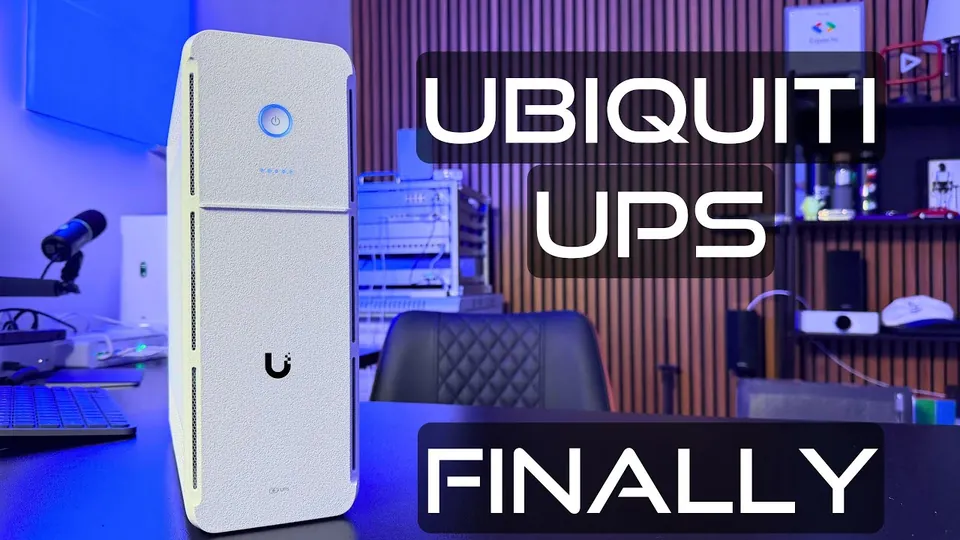
Prefer to watch? The full video is right here. 15:29 · Watch on YouTube
Jump to a section in the video
Design and ports
Out of the box it is nice and heavy, like any good UPS should be. If a battery backup is not heavy, it does not have much battery. It is white, of course, because Ubiquiti, with honeycomb venting along the top, bottom and sides. I hope a black version comes too, since black hides away nicely under desks.
On the front is a power button with an LED ring that also flashes blue when you hit Locate in UniFi, plus five dots that show battery remaining. I think the battery is replaceable, but I could not find an easy way to get to it and did not want to force it during the review.
Around back, a network port at the top handles the UniFi integration. Like most UPS units, outlets are split between battery plus surge protection and surge protection only. There are two 1 GbE ports to protect a network line, limited to 1 GbE, so no 10 GbE through here, plus a fuse reset and the power cord.
It is rated at 600 W, so it is not for big office printers or a crazy gaming or engineering PC. One design wish: make the battery side more obvious. In all my years in IT, people plug into the wrong side, lose power and lose data. Some brands light up the battery outlets in a different color, and Ubiquiti should do that next time.
Adoption and the UniFi interface
In UniFi, it showed up as UPS Tower and adopted quickly. The device page shows a graphic of battery and surge-only outlets, though not per-outlet detail like the PDU Pro. You get the uplink status, power utilization as a percentage of capacity, battery level, and specs like current, voltage and power factor. Mine was plugged into a USW Pro XG 8 PoE.
I raised my desk to see the draw change. Utilization sat at 12%, briefly jumped to 204 W while the desk motors ran, then settled at 72 W.
There is also a NUT server setting. NUT shares UPS status with other devices on the network, so third-party gear that listens for NUT can shut itself down when the UPS says it lost power. In settings, you can rename it, change IP settings, toggle the LED, locate, restart and power it off remotely.
Safe shutdown pairing
This is the feature that matters most. Safe Shutdown Pairing lets you pair UniFi devices with the UPS over the network, even when they are not plugged into it. I paired the UDM Pro Max in my rack, which is not physically connected to the UPS Tower. You can pair multiple devices, and I could have added my UNAS 2 once it was set up. When the UPS is running out of battery, it tells those devices to shut down. You can also trigger a safe shutdown remotely to test it.
Pulling the plug
I pulled it out of the wall. You get the classic UPS click as battery kicks in and a hum from inside, and the LED flashes blue. UniFi showed a power failure with the battery in use, and the battery panel switched to time until empty: 45 minutes of runtime for the UNAS 2, UNVR Instant, switch, Mac mini and monitor, not counting the desk.
A push notification arrived on my phone saying the UPS Tower had lost AC power with 99% battery remaining. I could not find a power warning on the home screen, which might come in a future update. Then I drained it, running the desk up and down, which is not the intended use. When it got down to its threshold, the console shut down on its own. I plugged the UPS back in to save my recording, and had to power cycle the UDM Pro Max by hand because it had safely turned itself off. Recharging was quick; it was back to three dots in no time, and the hum went away.
UPS Tower test results
| Test | What I saw |
|---|---|
| Idle load | 12% utilization |
| Desk motors running | Peak of 204 W, settling at 72 W |
| Runtime on battery | 45 minutes for monitor, Mac mini, switch, UNAS 2 and UNVR Instant |
| Notification | Push alert at 99% battery after losing AC power |
| Safe shutdown | Paired UDM Pro Max shut down safely as the battery ran low |
| Operating altitude | Up to 3,000 m (about 1.9 miles), per the spec sheet |
One test on my setup. Your load and runtime will differ.
What I would change
I wish it had a USB-C charging port, front or back. On other battery backups, plugging my phone into the front beats crawling around the floor for an outlet. There is no Ubiquiti screen, which surprised me, but it is meant to sit under a desk, and it is a budget item. I would also love per-outlet power cycling like the PDU Pro, though that will probably stay on the rack-mount pro models.
“This will be the main UPS that I recommend to folks now because of the remote monitoring.”
Who it's for
This is for desktops: next to a tower, or behind a monitor powering a Mac mini. It is also perfect for a small network on something like a Cloud Gateway Max, which it should keep running for a long time. At work, this is the one you give to Karen in accounting so her files never go kaput. Can you tell I have worked in IT a long time? For server racks, the 2U rack-mount UPS is the more powerful option.
The UPS Tower was $179 at launch, with the 2U rack-mount UPS announced at $299. Other UPS brands make monitoring annoying. This gives you UniFi's single pane of glass, notifications and safe shutdown that worked exactly as expected. It is a new product line, so I expect it to get better with firmware and new models, but I am glad Ubiquiti finally joined the fray. It now lives on my desk, keeping my recording setup running through an outage.
Gear in this story
- Dream Machine Pro MaxSpecs and compare for Dream Machine Pro MaxUbiquiti Store (opens in a new tab)
- UPS TowerSpecs and compare for UPS TowerUbiquiti Store (opens in a new tab)
- UPS 2USpecs and compare for UPS 2UUbiquiti Store (opens in a new tab)
- UNAS 2Specs and compare for UNAS 2Ubiquiti Store (opens in a new tab)
- Network Video Recorder InstantSpecs and compare for Network Video Recorder InstantUbiquiti Store (opens in a new tab)
- Switch Pro XG 8 PoESpecs and compare for Switch Pro XG 8 PoEUbiquiti Store (opens in a new tab)
- Power Distribution ProSpecs and compare for Power Distribution ProUbiquiti Store (opens in a new tab)
- UniFi Cloud Gateway MaxSpecs and compare for UniFi Cloud Gateway MaxUbiquiti Store (opens in a new tab)
- Apple Mac mini
Ubiquiti Store links are affiliate links. If you buy through them, the channel may get a small commission at no extra cost to you. Affiliate disclosure
Related stories
How to connect Starlink V5 directly to a UniFi network, no router needed
Aug 3, 2026 · 4 min read
UniFi Dream Machine Beast: the N2 processor makes it next generation
Apr 30, 2026 · 4 min read

The $79 UniFi Travel Router is here, and it brings your cameras with you
Dec 23, 2025 · 4 min read
Jesse Nowlin
Founder of TABGEEKS, former IT Director and Google Developer Expert. I test networking and pro tech on real job sites, then write up what I find.
Join the community