

Nintendo Switch 2 unboxing, setup and first impressions: worth the upgrade?
I've put hundreds, if not thousands, of hours into my Switch OLED. Here's the Switch 2 Mario Kart World bundle from box to data transfer to gameplay, plus a few surprises with accessories and microSD cards.

Jesse Nowlin
Founder, TABGEEKS · · 4 min read
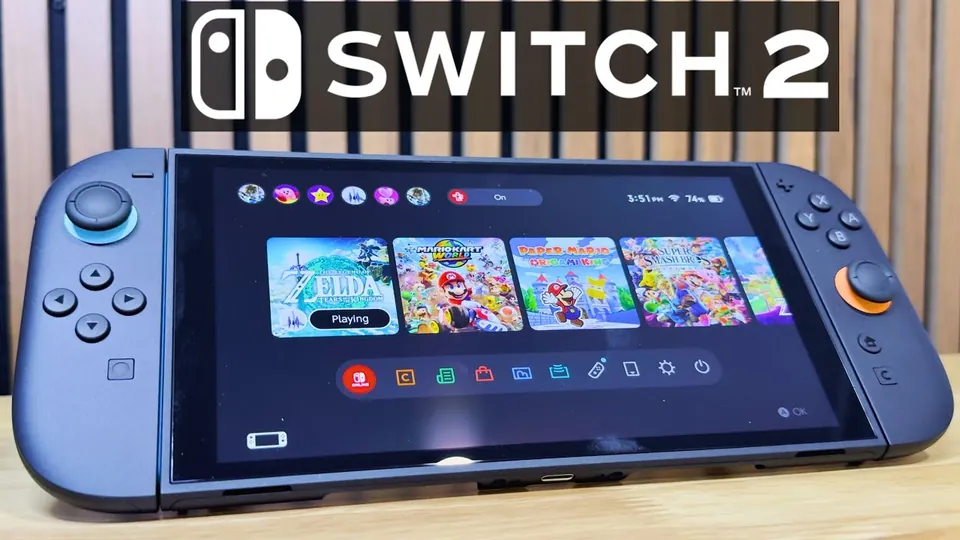
This is the Nintendo Switch 2 Mario Kart World bundle, sitting next to the Switch OLED I've put hundreds, if not thousands, of hours into. There are a hundred million unboxings out there, so I'll keep this one quick and focus on what matters: what's new, how the transfer goes, and whether it's worth the upgrade.
Short version: it's heavier, but it's more comfortable, much faster and has a bigger, brighter screen. My favorite game feels way snappier. There are a couple of gotchas, though, especially if you own XREAL glasses or a drawer full of old microSD cards.
Prefer to watch? The full video is right here. 30:27 · Watch on YouTube
Jump to a section in the video
Unboxing and hardware tour
Under the top layer are the extras: the power adapter, which supports 15 W, 27 W, 45 W and up to 60 W at 5, 9, 15 and 20 V, a certified Ultra High Speed HDMI cable and wrist lanyards that pop onto the Joy-Cons. The bundle includes a full Mario Kart World download with a scratch-off code, which is half the reason I bought it.
The console has a larger screen, big speaker grills on the bottom, fan vents on the top, and USB-C ports on both the top and bottom. Up top there's the power button, volume rocker, USB-C, a headphone jack (excellent, unlike Apple) and the game card slot. The new Joy-Cons attach magnetically, and it's a nice, satisfying magnet.
The dock adds HDMI out, an Ethernet port if you want to hardwire it and two USB ports for charging peripherals.
Switch 2 vs. Switch OLED
Holding both, the weight difference is obvious. The Switch 2 is a beefy boy. The OLED is lightweight and comfortable, so I can see keeping it charged in a bag for the road. If you want something light, especially for kids, a secondhand OLED is still a good purchase, even though it's slow, which drives me crazy. The Switch 2 is heavier but more comfortable to hold and significantly faster.
Setup and data transfer
Setup walks you through the new play styles, including the stand, which holds at whatever angle you like. Then it offers to transfer data from your old Switch. You plug in the new one, bring the systems close and start System Transfer to Nintendo Switch 2 from the old console's settings. Mine counted down from 13 minutes to 4 to 2 and finished.
It even carried over my theme, so I landed in dark mode, and it imported the screenshots and videos from the old microSD card into system memory. One catch: it seems to drop profiles that aren't linked to a Nintendo account.
A warning about your screen
Someone in the comments let me know people are getting brand-new Switch 2 screens scratched by receipts stapled to the box. When you're checking out, don't let them staple anything to the front of the box.
XREAL glasses: no dice
I was hoping to use my XREAL AR glasses with it. I tried the bottom USB-C port, the top USB-C port, plugged in to power, and the XREAL Hub. Every time, I got no video signal detected. I've reached out to XREAL to see if they have suggestions.
“All right, that's really disappointing.”
Tears of the Kingdom and old microSD cards
Tears of the Kingdom, my favorite game, loaded fast, and that's not even the upgraded Switch 2 edition, which I haven't bought yet. It feels way snappier and brings back some of the joy that had turned into frustration on the old hardware.
The surprise: my SanDisk Ultra 512GB microSD card doesn't work. The Switch 2 says it can't be read and requires a microSD Express card. It pulled my screenshots off it during transfer, but it won't use it for storage. So check your cards before you buy accessories.
Virtual game cards
Nintendo's new virtual game cards let you share a game with another device in your family group. I loaded one on my old Switch while it was running on the Switch 2. It refused, saying the software was being played on the other system. Once I closed it there, it loaded. So you can share between devices, just not play the same copy on both at once.
Mario Kart World and 4K on a TV
Redeeming Mario Kart World means entering the 16-character download code, and it's a 21.9 GB download. It's worth the wait. It's a wide-open world to drive around, and I could sit there playing it all day.
Docked, the Switch 2 can upscale to 4K on a 4K TV, which is only possible in the dock. Docked Zelda felt great, though the Nintendo Switch logo itself didn't get the 4K treatment, which is rude.
Is the Switch 2 worth it?
It's selling like hotcakes, and if you've had a Switch or Switch OLED, or you've been a Nintendo fan for years, it's worth it if you can afford it. The screen is bigger, the processor is so much faster, and my favorite games are a big improvement.
My one gripe: I have to pay to upgrade games like Zelda to their Switch 2 versions. It's not that expensive, but the more games get upgraded, the more it adds up. I get that updating those games takes a lot of work. Bottom line, it's the next generation, and it's fantastic.
Gear in this story
- Nintendo Switch 2 Mario Kart World bundle
- XREAL AR glasses
- SanDisk Ultra 512GB microSD card
Ubiquiti Store links are affiliate links. If you buy through them, the channel may get a small commission at no extra cost to you. Affiliate disclosure
Related stories
Hands-on with the new Meta Ray-Ban Gen 3: Aviators, a camera-free option and a smaller camera
Sep 25, 2026 · 4 min read
Unboxing XREAL Aura: Android XR in a case that fits your backpack
Jun 24, 2026 · 5 min read
XREAL's Project Aura, X1S chip, Neo battery and Enterprise push: my interview with Ralph
Jun 12, 2025 · 4 min read
Jesse Nowlin
Founder of TABGEEKS, former IT Director and Google Developer Expert. I test networking and pro tech on real job sites, then write up what I find.
Join the community