

Home / Stories / UniFi + Networking
Powering a Starlink Mini from a UniFi Cloud Gateway Industrial
Ubiquiti says the UCG Industrial's 90 W PoE+++ ports can power satellite terminals. That needs an asterisk, but with a step-up adapter I got a Starlink Mini online from one Ethernet port.

Jesse Nowlin
Founder, TABGEEKS · · 2 min read
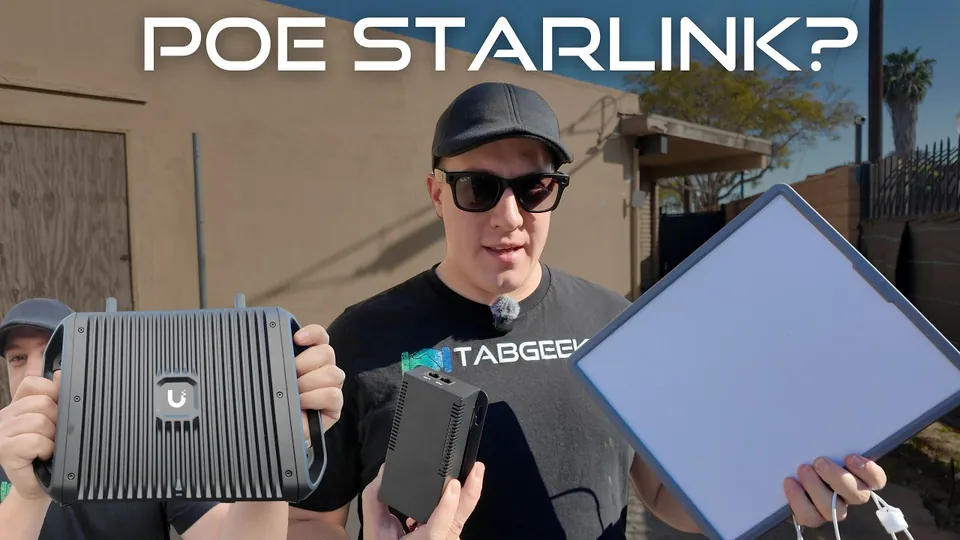
Ubiquiti says the Cloud Gateway Industrial, with multiple 90 W PoE+++ ports, can directly power LEO satellite terminals. I'm giving that an asterisk, because it is not exactly direct. But with a step-up adapter, it works. I powered a Starlink Mini off a single Ethernet port on the UCG Industrial and got it online.
Here is the hardware you need, how I wired it, what it pulled, and one cable mistake to avoid.
Prefer to watch? The full video is right here. 5:20 · Watch on YouTube
Jump to a section in the video
The parts
Two pieces make this work. The first is a PRO CET step-up adapter, which sits between the UCG Industrial's PoE+++ port and the dish. The second is a cable with the Starlink power connector on one end and two bare power pins on the other, which go into the adapter.
How I wired it
The cable from the PoE+++ Ethernet port on the UCG Industrial goes into the PoE side of the step-up adapter. A light on the adapter confirms it has power. The power cable from the adapter then plugs into the Starlink Mini's power port.
For data, a second cable goes from the Starlink Mini's network port back to the LAN side, so the Mini's internet path runs back to the rack. On the Mini you end up with two cables: one for power and one for data. A little blue status LED showed the Starlink was online. I set it on the ground pointed at the northern sky, where I get signal.
First boot and a firmware detour
I hadn't used this Starlink in a while, and I had to do a bunch of troubleshooting. It turned out it needed a manual firmware update. I probably should have booted it up at home first. But the important part: it was running entirely off the UCG Industrial's PoE+++ port.
Power draw and speed
Starlink Mini on UCG Industrial PoE+++
| Measurement | Result |
|---|---|
| Power draw | 21 W |
| Download | About 110 Mbps, while downloading a software update |
| Upload | About 20 Mbps |
It is still incredible to me that a little dish pointed at the sky is pulling down internet like that, especially while updating itself.
Use the right Ethernet cable
My power cable was gray and went to the power side of the injector. The data cable was a white Ubiquiti cable, and I don't recommend that. It got stuck in the Mini's port, and I had to go in with my Leatherman to get it out, as in a previous video. Get a Starlink Ethernet cable with the pull-out plug, which also maintains the waterproofing. Depending on your setup, you may want longer power and Ethernet cables too.
“You can power the Starlink Mini directly through, well, asterisk directly, with a step-up converter, through the UCG Industrial.”
Bottom line
It works. With a PRO CET step-up adapter and the right power cable, a single PoE+++ port on the UCG Industrial can run a Starlink Mini and get it online. Next, I want to try my other Starlink dishes and more adapters. I also hope Ubiquiti brings this high-power PoE to more of the lineup. I keep backup Starlink dishes at many locations in case the local backbone or cellular goes down, and I'd love to power them from my main rack and its battery backup, not just in industrial setups.
Gear in this story
- Cloud Gateway Industrial (UCG Industrial)Specs and compare for Cloud Gateway Industrial (UCG Industrial)Ubiquiti Store (opens in a new tab)
- PRO CET PoE step-up adapterAmazon (opens in a new tab)
- Starlink power connector cableAmazon (opens in a new tab)
- Starlink Mini
Some of these store links are affiliate links. If you buy through them, the channel may get a small commission at no extra cost to you. Affiliate disclosure
Related stories

UniFi U7 Mesh tested: how far can a Wi-Fi 7 mesh link go?
Mar 2, 2026 · 4 min read
Moving 19 TB from the UNAS Pro to the UNAS Pro 8, then growing the pool to 56 TB
Feb 25, 2026 · 5 min read
UniFi Cloud Gateway Industrial review: the toughest UniFi gateway, installed on a job site
Feb 19, 2026 · 5 min read
Jesse Nowlin
Founder of TABGEEKS, former IT Director and Google Developer Expert. I test networking and pro tech on real job sites, then write up what I find.
Join the community