

Home / Stories / UniFi + Networking
UniFi G6 180 review: the 180 degree camera I have waited years for
For years a busy corner has beaten every camera I have pointed at it. The UniFi G6 180 stitches two 4K sensors into one 180 degree view, and it finally covers the whole thing.

Jesse Nowlin
Founder, TABGEEKS · · 5 min read
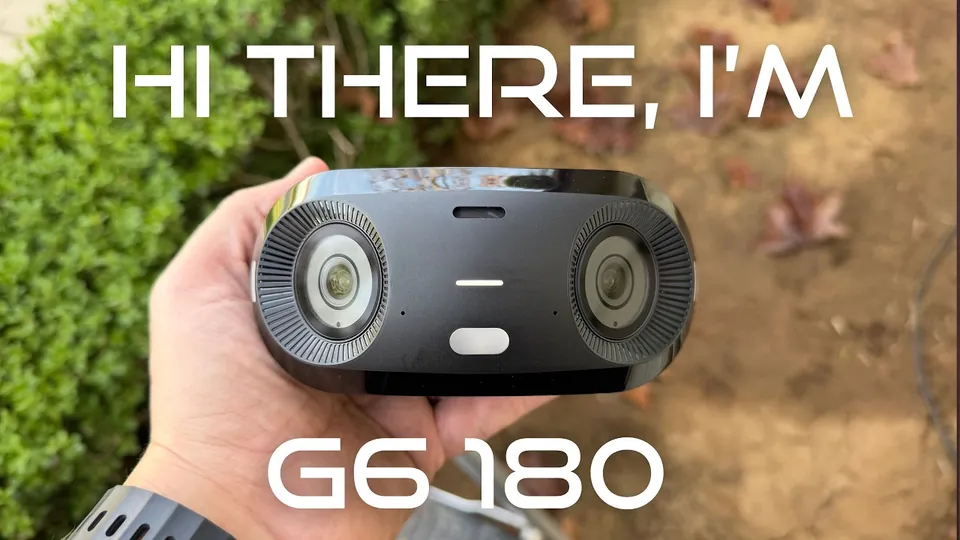
This is a camera I have been waiting a very long time for. Yes, other companies make one. Shut up. This is the one I want. The UniFi G6 180 has two cameras inside and stitches them into one ultra-wide shot.
Here is my problem. My house is on a very busy corner, with a busy street out front and an even busier one down the side. I tried PTZ cameras, first the G5 PTZ and then the G6 PTZ. But when a PTZ is looking left, it isn't seeing right. I even tried a camera on each end that snapped the PTZ toward motion. What I really wanted was one 180 degree camera pointed parallel to the street to catch everything. I mounted the G6 180 in that exact spot and tested it day and night. Bottom line: it works, the stitching is barely noticeable, and its only real drawback is 20 frames per second.
Prefer to watch? The full video is right here. 29:18 · Watch on YouTube
Jump to a section in the video
Smaller than an iPhone
It is way smaller than I expected. I said that at the Ubiquiti World Conference too. It is shorter than my iPhone 17 Pro Max, and next to a G6 Instant, it is wild that this holds two cameras. If this is where cameras are headed, sign me up.
G6 180 hardware
| Feature | Details |
|---|---|
| Sensors | Two 4K 8MP sensors, 1/1.8 inch |
| Field of view | 180 degrees, two lenses stitched |
| Frame rate | 20 fps max |
| Night vision | IR up to 20 m (65 ft), plus color night vision |
| Lighting | Integrated LED spotlight and side lights |
| Audio | Dual microphones |
| Rating | IP66 weatherproof, IK04 tamper resistant |
| Power | PoE+ with a waterproof connector |
| Bottom access door | USB-C accessory port, microSD slot, reset button |
| Colors | Black and white |
The accessory port is for an enhancer, as on the other cameras, and I think that will come in very handy in my case.
The one drawback: 20 fps
I am a more-frames kind of guy. I like 60 or even 120. Most security cameras do 30. This does 20, tops. In my footage, people walking through looked fine once playback loaded. Is it as smooth as the G6 PTZ or a G6 Bullet? No, those are higher frame rate cameras. But for what this is doing, stitching two sensors across the whole view, I'm thrilled.
In the box: a mount for everything
You get a mounting template, a wedge mount, a pole mount with bracket, a ceiling adapter, and a nicely laid-out hardware kit with a screwdriver, waterproofing pieces, grommets for different cable sizes, a security key and screws. Ubiquiti didn't have to include this much, and it is an incredible value. The bracket slots onto the back with four connection points and a really satisfying click.
All that mounting gear opens up other uses: on a ceiling looking down a hallway, or above elevators covering a whole lobby area with one camera instead of one stuck in a corner.
Setup and first look at the stitching
It adopted into Protect in seconds and immediately grabbed an update. Up close on my desk, the stitch line in the middle was obvious on my face. That is expected. Ubiquiti's FAQ says the ideal mounting height is 3 to 4 m, about 12 ft, and too close means it doesn't have enough room to stitch. It also optimizes itself after the first couple of hours.
Settings include tamper detection, which can log an event or trigger an alarm so a siren goes off if someone whacks it. On the video wall it shows as an ultra-wide tile you can zoom into.
Installation tips
I replaced my G5 PTZ test camera on the corner with the G6 180. Two lessons. First, I didn't notice until the next morning that there is an articulating mount on the back with a torque screw, so getting the angle right is easy. I used the wedge mount because I wanted more sidewalk and less street. Second, don't use a cable that is too thick. My direct burial armored cable barely fit through the cable channel and was a real pain, so I ran a standard outdoor cable instead. It also boots up super fast.
Daytime: where's the seam?
I walked back and forth right through where the two lenses meet, and it is barely noticeable unless you are looking for it. I could only find the seam by a leaf in the grass. I also tried the Lens Fusion Offset setting, which "reduces distortion where the two lenses join," cranking it to each extreme. I honestly couldn't make it look worse. Ubiquiti is doing some solid stitching.
The view was beautiful, with clear detail on leaves and colors across the whole frame. It detected people well. Cars got picked up more on one side than the middle, but that was by design, since I aimed it at the sidewalk.
Night vision
It was a foggy night with only distant streetlights, and I don't have lights on the outside of my house. With just IR, I was impressed by how much was visible across the frame. With color night vision, a passing motorcycle and car looked good, and I could see flowers and leaves on the ground, a little fuzzy but really solid for a camera like this. This is not an LPR camera, especially at my angle.
Color night vision took a second to come on, likely because bushes and a tree block the sides, so people were midway through the frame before it triggered. My fix is padding events with two or three seconds on each end. Firmware updates usually improve this.
“I've been begging for something like this for years because of my exact use case.”
The embedded heater
Instead of the usual desiccant, the G6 180 has a heater, also on the G6 Entry. Per the FAQ, it runs for the first 6 hours after setup to remove moisture and prevent condensation, and the housing will feel warm. It also runs on every startup, so if condensation shows up, a power cycle runs it for another 6 hours. That may save you an RMA.
Bottom line
At $299 in the US store, I think it's a steal. It isn't a high-end enterprise camera, and it is a different use case. If you need advanced LPR or a higher frame rate, pair it with a contextual camera where you need those details. For broad, continuous coverage of a street, driveway, yard or lobby with one device, this is the camera I have been asking Ubiquiti for, and I think it is going to fly off the shelves.
Gear in this story
- Camera G5 PTZSpecs and compare for Camera G5 PTZUbiquiti Store (opens in a new tab)
- Camera G6 180Specs and compare for Camera G6 180Ubiquiti Store (opens in a new tab)
- Camera G6 PTZSpecs and compare for Camera G6 PTZUbiquiti Store (opens in a new tab)
- Camera G6 InstantSpecs and compare for Camera G6 InstantUbiquiti Store (opens in a new tab)
- G6 180 EnhancerSpecs and compare for G6 180 EnhancerUbiquiti Store (opens in a new tab)
- Camera G6 BulletSpecs and compare for Camera G6 BulletUbiquiti Store (opens in a new tab)
- Reader G6 EntrySpecs and compare for Reader G6 EntryUbiquiti Store (opens in a new tab)
Ubiquiti Store links are affiliate links. If you buy through them, the channel may get a small commission at no extra cost to you. Affiliate disclosure
Related stories

Ubiquiti World Conference Miami 2025: everything I'm allowed to share
Nov 6, 2025 · 4 min read

UniFi AI Port: adding face and plate recognition to older cameras
Dec 12, 2024 · 4 min read

UniFi Device Bridge IoT review: a $49 fix for wired-only devices
Nov 20, 2025 · 3 min read
Jesse Nowlin
Founder of TABGEEKS, former IT Director and Google Developer Expert. I test networking and pro tech on real job sites, then write up what I find.
Join the community