

XREAL Air 2 Pro vs XREAL One: which display glasses should you buy?
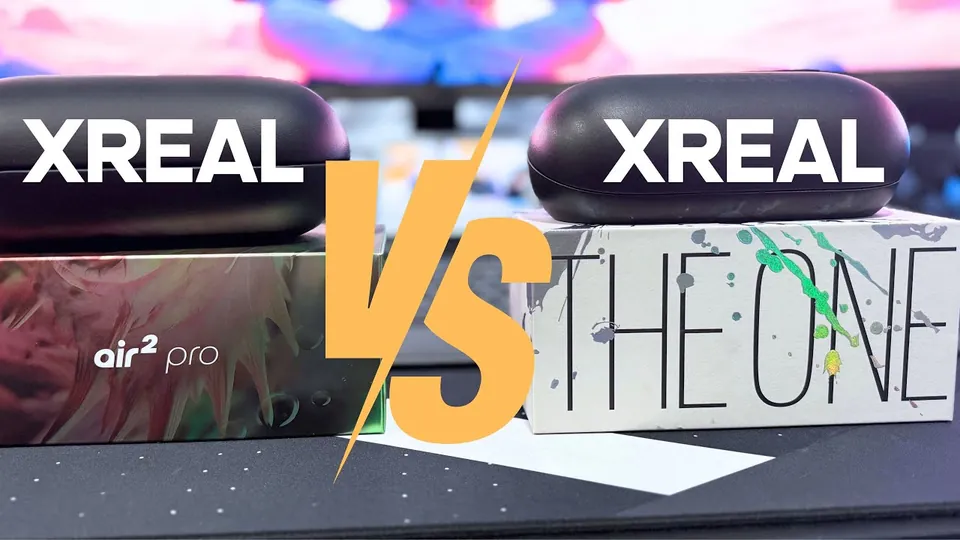
I have been using XREAL's last-generation Air 2 Pro and the new XREAL One for a couple of weeks. Here is how they compare on design, screens, sound and the one feature that makes the One worth it for work.

Jesse Nowlin
Founder, TABGEEKS · · 4 min read
The XREAL booth was a runaway success at this year's CES, and Linus Sebastian from Linus Tech Tips even showed off the XREAL One glasses on The Tonight Show. XREAL has come out as a definite leader in XR glasses: well built, not too expensive and relatively simple to use.
XR is the bucket term for virtual reality, augmented reality and everything in between, and with so many features, the category gets confusing. I have the new XREAL One and the previous generation Air 2 Pro, and after a couple of weeks with both, here is my side-by-side to help you decide. And because things were not complicated enough, the One Pro is on preorder, shipping in March. I have a pair ordered, so I will cover how it differs too.
Prefer to watch? The full video is right here. 11:42 · Watch on YouTube
Jump to a section in the video
Why wear a screen on your face?
At my desk I have a 49 inch Samsung Odyssey G9 ultrawide and a 27 inch Dell 4K monitor. So why glasses? When I take my laptop out, I am stuck on a 14 inch screen. On a plane, watching a movie or playing my Nintendo Switch, I am stuck with that device's screen, and the same goes for phones and tablets.
These glasses blow that small screen up into a big screen in front of you that nobody else can see, so there is a privacy benefit too, even when the seat back in front of you has no screen at all. Unlike Apple Vision Pro or Meta Quest, there is no battery or computer inside. A USB-C cable plugs into the back of the glasses and into your tablet, phone, console or computer, which sees the glasses as an external display.
Design and buttons
From the top down they look almost the same, but side by side the XREAL One is significantly thinner. It is slightly heavier, but unless you hold both at once, you do not notice. The One adds a red button on the bottom and a shortcut button on top, alongside the volume and settings rocker the Air 2 Pro also has. That shortcut controls electrochromic dimming, how see-through the lens is, and can be mapped to other things.
The speaker grilles on the One are significantly longer, and the speakers are tuned by Bose. It makes a difference. The Air 2 Pro sounds tinnier and more hollow, while the One has a very full sound, comparable to a pair of headphones.
Specs side by side
XREAL Air 2 Pro vs XREAL One vs XREAL One Pro
| Spec | Air 2 Pro | XREAL One | XREAL One Pro |
|---|---|---|---|
| Screen | 0.55 in micro OLED | 0.68 in, Sony panel | Sony next generation OLED |
| Resolution | 1920 x 1080 per eye | 1920 x 1080 per eye | Not stated |
| Refresh rate | Up to 120 Hz | Up to 120 Hz | Not stated |
| Field of view | 46 degrees | 50 degrees | 57 degrees |
| Brightness | Up to 500 nits | Up to 600 nits | Up to 700 nits |
| Weight | 75 g | 84 g | About 3 g more than the One |
| Spatial chip | None, needs a dongle | Custom X1 chip | Not stated |
| Price | $399 | $499 | $599, shipping in March |
As stated in the video at publication. Prices change.
The big difference is the XREAL One's custom X1 chip, which handles spatial computing so your screen can stay where you put it or follow you around. With the Air 2 Pro, you needed an additional dongle for that.
Ultrawide mode is the killer feature
I saved the best for last. My favorite feature, and the one that makes the One so much more valuable than the Air 2 Pro, is ultrawide mode. The Air 2 Pro gives you a single standard screen. On the One, you can turn on a curved ultrawide display, like the monitor on my desk, with two screens side by side in space. You lose some height compared to a giant screen of up to around 155 inches, which is fantastic for immersive games and movies. But if you are trying to get work done on a computer, this is the way to go.
“I'm using them on a daily basis now and actually am disappointed when I leave the house without them.”
Sound leakage and screen quality
On a plane or in bed next to someone, use real earphones instead of the downward firing speakers on either pair. If you crank the volume to beat engine noise, people around you will hear it. In a waiting room with some ambient noise, I asked someone nearby if they could hear my music at a comfortable volume, and they could not. Turned all the way up, they started to. In a perfectly quiet room, it is definitely audible.
When you do use the speakers, go with the One. At one point I forgot I was not wearing headphones and cranked it when Shinedown came on. They might be a little too good: I caught myself bobbing my head to the music, and since the display compensates for movement, the screen moved with me.
The displays are very good, but we are not quite there yet. I am a stickler for a high quality screen, with an iPhone 16 Pro Max and a Pixel 9 Pro Fold, and I have very good eyesight. I do see pixels and slight blurriness from time to time. If that does not bother you, this is the best we have, save for maybe the $3,500 Apple Vision Pro, and this tech only gets better from here.
Bottom line
If you are using these for work, like I am, get the XREAL One for the X1 chip and ultrawide mode. If you mostly want media on a bigger, more private screen, the Air 2 Pro will be fine, and as last generation, its price will probably drop. Or wait for the One Pro, with a wider field of view, a brighter screen and next generation Sony displays. I will do a follow-up when my pair arrives.
Gear in this story
- XREAL Air 2 ProAmazon (opens in a new tab)
- XREAL OneAmazon (opens in a new tab)
- XREAL One Prous.shop.xreal.com (opens in a new tab)
- XREAL (affiliate link)xreal.pxf.io (opens in a new tab)
- DJI Pocket 3Amazon (opens in a new tab)
- DJI Mic MiniAmazon (opens in a new tab)
Some of these store links are affiliate links. If you buy through them, the channel may get a small commission at no extra cost to you. Affiliate disclosure
Related stories

Smart glasses, the next frontier: Meta, Lenovo and XREAL on where the category goes next
Jun 12, 2025 · 6 min read
Google I/O 2025 recap: Beam, Gemini Live, Android XR and everything I cared about
May 28, 2025 · 5 min read

XREAL Project Aura at Google I/O: everything Ralph Jodice told me
May 29, 2026 · 5 min read
Jesse Nowlin
Founder of TABGEEKS, former IT Director and Google Developer Expert. I test networking and pro tech on real job sites, then write up what I find.
Join the community