

OBSBOT Tiny 3 Lite and Vox SE review: a budget creator setup that doesn't look like a potato
New creators always ask me for an affordable setup that looks and sounds good. I swapped my DJI gear for the OBSBOT Tiny 3 Lite webcam and Vox SE mic to find out if this is it.

Jesse Nowlin
Founder, TABGEEKS · · 4 min read
I have made a couple of hundred videos and tried pretty much every setup, big and small. Right now I record on a DJI Pocket 3 with a DJI Mic Mini, and I love how well they work together. But the question I get most from people just starting out is: what is an affordable setup that won't look like it was filmed on a potato and will actually sound good, without buying a ton of hardware?
OBSBOT sent over the Tiny 3 Lite 4K webcam and the Vox SE wireless microphone, so I unboxed both, switched my desk over from DJI, and tested video quality, AI tracking, voice controls, the noise canceling and a teleprompter trick. For $179 and $55, compared to the DJI gear, it is a definite steal.
Prefer to watch? The full video is right here. 12:01 · Watch on YouTube
Jump to a section in the video
What's in the boxes
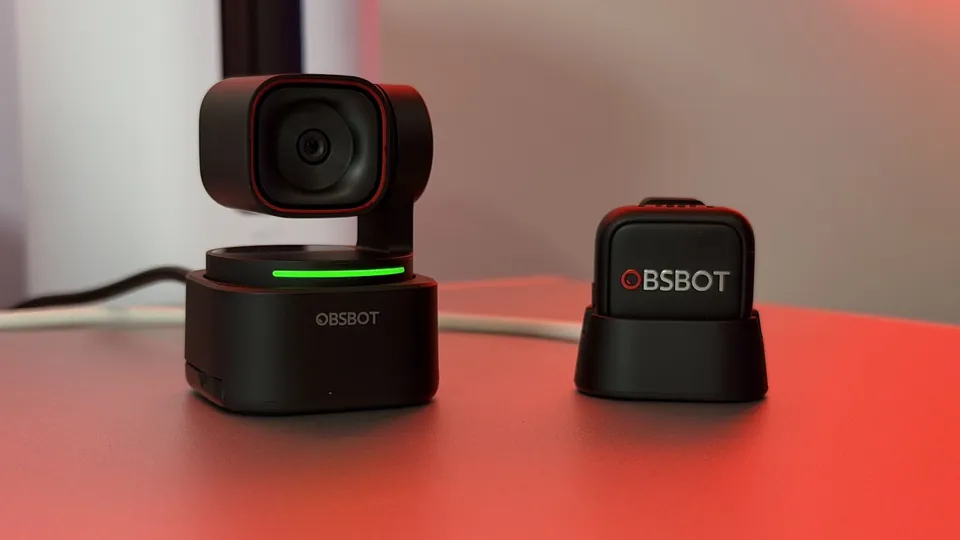
The Tiny 3 Lite really is tiny. It is shorter than my AirPods Pro case. It has a standard tripod mount on the bottom that pops out, or you can clip it on top of your monitor and position the rear brace to hold it steady. In the box you get a USB-C to USB-C cable, loosely measured at about 5 ft, which is enough to route behind your computer, and a USB-A to USB-C adapter for older ports, which I always like to see. The user manual is short but in about 15 languages.
The Vox SE comes in a nice travel pouch with four small internal pockets. Inside are a USB-A to USB-C cable of about a foot, a dead cat windscreen for outdoor or handheld use, a small gold pogo pin charging stand with a USB-C port on the back, and a lanyard with a magnetic clip that attaches to the back of the mic. The mic itself is thinner than my finger, and definitely thinner than the DJI mic I was wearing.
Software, 4K and AI tracking
I switched my recording app, Screen Studio on the Mac, over to the OBSBOT before updating firmware or changing anything. The mic paired quickly, and the app shows battery level and plenty of settings, including picture in picture modes.
One catch: it was recording in 1080p until I changed it, so check that setting and switch to 4K. You can also raise the recording bit rate if your computer can handle it.
Tracking works well. Double-click yourself in the video preview and it zooms right to you. When I held up products the way I do in reviews, it pulled focus to the product and back to my face. Lighting will change your results. I have a fairly harsh key light and accent lighting, and I will keep tuning, but this is a pretty solid camera.
Live streaming and noise canceling
I go live most Fridays to go over the products that came in that week and the news, and I keep gear on the desk to show off. The camera has to reframe and refocus on whatever I am holding. With an access control doorbell in my hand, the Tiny 3 Lite grabbed focus on it and pulled back to my face nice and easy.
My studio is in the garage at home, so the Vox SE's noise canceling matters. During the test there was noise right outside a window about 5 to 6 ft away that I could hear in the room, and the mic did a great job canceling it out.
“People will watch a stream even if it's filmed with a potato as long as your audio is really good.”
Voice controls and five audio modes
Say "Hi Tiny, track me" and it tracks you. "Hi Tiny, zoom in closer" and "zoom out further" work, and "Hi Tiny, sleep Tiny" turns it off.
The five audio modes
| Mode | Best for |
|---|---|
| Directional | Presentations or podcasts with background noise, focuses on the voice in front |
| Dual direction | Interviews and two-host podcasts, front and rear voices, cancels the sides |
| Pure audio | Studio-grade audio with zero processing, for music or ASMR |
| Smart omni | 360 degree pickup for meetings and group discussions |
| Spatial audio | Stereo with enhanced left and right separation, so headphones hear where people sit |
The teleprompter trick
I had Gemini write a short script about the Tiny 3 Lite, enlarged it in the software's teleprompter, placed it just under the camera and adjusted the speed because I talk fast. I normally use an Elgato Prompter XL or the classic Elgato Prompter, which reflect a screen onto glass in front of the lens. That is the way to go if you want to look straight into the lens, but if your webcam sits on top of your monitor and you don't want to buy extra equipment, this works.
Bottom line
If you want an affordable camera and mic to get started streaming, working remotely or making videos, this is a good option. The OBSBOT Tiny 3 Lite was $179 and available on Prime on Amazon, and the Vox SE wireless mic was $55 when I tested them. For what you get in 4K video, tracking, voice control and noise canceling, that is great value.
Gear in this story
- OBSBOT Tiny 3 Lite (official store)obsbot.com (opens in a new tab)
- OBSBOT Tiny 3 Lite (Amazon)Amazon (opens in a new tab)
- OBSBOT Vox SE wireless microphone
Some of these store links are affiliate links. If you buy through them, the channel may get a small commission at no extra cost to you. Affiliate disclosure
Related stories
DJI Osmo Nano unboxing and first look: a tiny camera with a lot in the box
Oct 1, 2025 · 4 min read
Aohi Starship 240W power bank review: laptop power in a soda can
Apr 2, 2025 · 3 min read
Don't film everything: my framework for covering tech conferences
Jun 12, 2026 · 6 min read
Jesse Nowlin
Founder of TABGEEKS, former IT Director and Google Developer Expert. I test networking and pro tech on real job sites, then write up what I find.
Join the community