

DJI Osmo Nano unboxing and first look: a tiny camera with a lot in the box
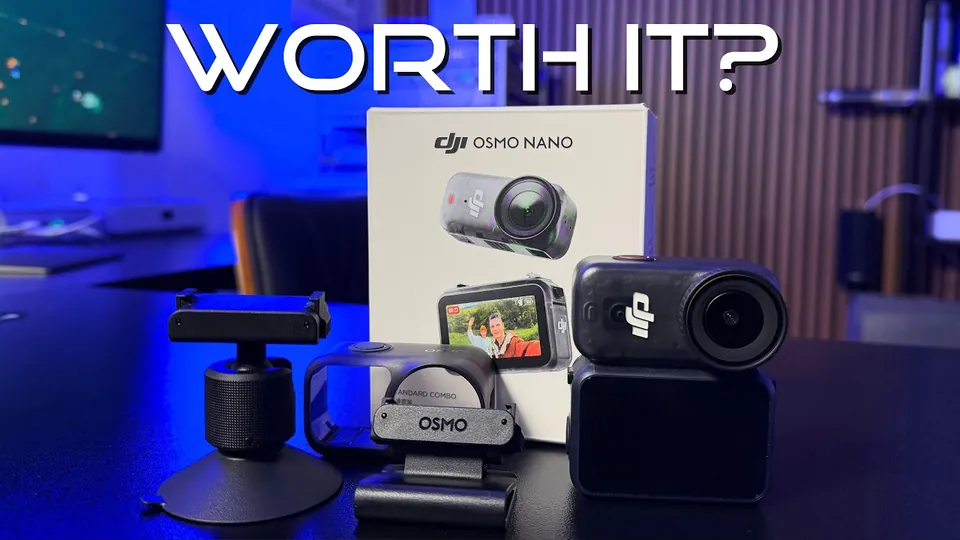
I bought the DJI Osmo Nano myself, and it's even smaller than I expected. Here's everything in the standard combo, how the magnetic mounts and detachable screen work, and why it's going in my go bag.

Jesse Nowlin
Founder, TABGEEKS · · 4 min read
I'm a bit of a camera nerd and a fan of DJI. I have the Osmo Action 4, I'm in the middle of reviewing the Osmo 360, and I skipped the Action 5 because I heard this was coming. This is the new DJI Osmo Nano. To be clear, this isn't sponsored. I bought it with my own money.
This is a first look: unboxing, setup and how the mounts work. Deeper testing comes later. The first thing that hit me was the size. This thing is tiny, and the standard combo comes with far more in the box than I expected.
Short version: for the price and the amount of gear you get, it's fantastic. I'm keeping it.
Prefer to watch? The full video is right here. 21:18 · Watch on YouTube
Jump to a section in the video
How small is it?
Next to the Action 4, it's slightly taller, but turn the Action 4 on its side and the Nano is shorter, a bit more than half as tall. It's super light. People online compare it to the Insta360 Go and point out that one is even smaller. From the specs alone, I think the Nano comes out ahead, so I'm not mad it's a little bigger.
The body is partially transparent. That white on the back isn't a sticker, it's the internals. I love that, though I wish it were as transparent as DJI's microphones.
The vision dock and mounting system
The camera snaps into the multifunctional vision dock, which is the screen. Unlike the one-direction mount on earlier action cameras, it can go both ways, front or back facing, because the bottom half is the screen. It attaches magnetically and clicks in. Make sure it clicks all the way.
Inside the dock's door is USB-C charging and a microSD card slot. The camera itself has 64 GB of storage, and the box mentions swift content transfer, so I suspect you move files to the card rather than recording straight to it. I'll confirm that in testing.
The best trick: the screen works wirelessly. Pull the camera off and the dock still shows a live view. Rotate it and it switches between vertical and horizontal, and once you hit record it locks the aspect ratio. That's very smart.
Specs, as stated
| Spec | Osmo Nano |
|---|---|
| Video | Up to 4K 60fps |
| Color | 10-bit log |
| Field of view | 143 degrees |
| Internal storage | 64 GB |
| Camera waterproofing | 10 m |
| Vision dock | IPX4 splash resistance, only when attached to the camera |
| Battery | Up to 200 minutes extended (camera plus dock, per the box) |
| Price | $299, standard combo |
As stated in the video and on the box, October 2025.
Everything in the standard combo
This isn't the creator pack. It's the standard combo, and it still includes the camera, the vision dock, a protective case, a magnetic hat clip, a magnetic lanyard, a dual direction magnetic ball joint adapter mount with a suction cup, a USB-C to USB-C cable, documents and DJI stickers.
The lanyard felt like my old Army dog tags, and the magnet is strong. The hat clip mount also matches DJI's other mounts, so it's cross compatible with the Action cameras. The clip is magnetic too, which is how you shoot landscape on the lanyard.
Setup and firmware
Out of the box the camera showed 61%. Activation in the DJI Mimo app took a verification code and the usual terms. A firmware update was waiting, adding slow motion playback, improved power and heat management, a super night mode, DJI Mic 3 support, vertical live view preview, horizon balancing in EIS and hyperlapse, anti-motion blur in low light and SD card status in the app.
It also connects directly to DJI microphones. I have the Mic Mini and Mic 2, and being able to link a mic with no dongle is what I love about these cameras. At 4K 30, the 64 GB of storage worked out to about 1 hour and 48 minutes of recording.
“This sucker I am keeping. This is going in my go bag.”
How I plan to use it
I put it on the hat clip at my desk, and it was so light I hardly felt it. It captured my notes, my computer and the rack, which is perfect for unboxing videos filmed first person. I also ride an electric scooter along the beach, and this will be fun for first-person views there.
One of my favorite things to do is a time-lapse of a flight out the airplane window. I usually use the Pocket 3. Nine times out of 10, airlines don't mind, though once I was asked to take it down, and if crew tells you to, you listen. The Nano would be much less noticeable on a window. Battery life on a long flight is my concern, so that needs testing.
For conferences and events, the magnetic body is the killer feature. As long as there's a wall, I can stick it up and film without worrying about a mount.
Bottom line
The DJI Osmo Nano standard combo was $299 at launch, and for the size, the specs and how much comes in the box, it's fantastic. The wireless screen and magnetic mounts make it incredibly versatile. Well done, DJI. A full review is coming after more testing.
Gear in this story
- DJI Osmo Nano Standard Combo
Ubiquiti Store links are affiliate links. If you buy through them, the channel may get a small commission at no extra cost to you. Affiliate disclosure
Related stories
Aohi Starship 240W power bank review: laptop power in a soda can
Apr 2, 2025 · 3 min read

Don't film everything: my framework for covering tech conferences
Jun 12, 2026 · 6 min read

Telly review: what it's like to live with a free 55 inch TV
Feb 13, 2025 · 4 min read
Jesse Nowlin
Founder of TABGEEKS, former IT Director and Google Developer Expert. I test networking and pro tech on real job sites, then write up what I find.
Join the community