

Telly review: what it's like to live with a free 55 inch TV
Telly's pitch is a free TV paid for by ads and your data. I signed up, got one of the first units, and put it on my studio wall. It is a genuinely good TV, with a catch you should understand.

Jesse Nowlin
Founder, TABGEEKS · · 4 min read
A long time ago, I signed up for a crazy concept: a free TV from a company called Telly. Their reasoning is simple. Roku, Vizio, Amazon Fire and other cheap TVs already make a lot of money from your data, what you watch, what you buy and which ads you like, and they still charge you for the TV. It is subsidized, but you pay.
Telly flips that. They take even more data, show you ads, and give you the TV for free. I figured either the company would go out of business and never ship, or I'd get a free TV and a video out of it. It turns out I was one of the first households in the country to get one, and it is now on my studio wall.
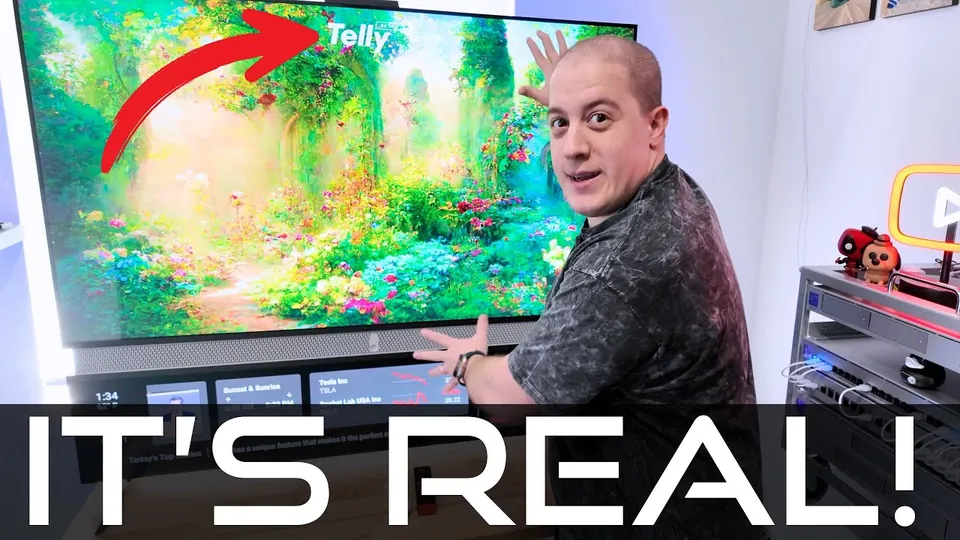
Prefer to watch? The full video is right here. 22:22 · Watch on YouTube
Jump to a section in the video
If you're not paying, you are the product
That is a universal rule, and it applies here. When I signed up, I filled out a whole bunch of surveys, and more detailed ones when it was ready to ship. They asked about the people in my household, the platforms I use and much more, all designed to get the data they can sell.
There is a built-in microphone and a webcam. The webcam has a privacy cover, but there are still real questions about putting a listening device from a very young company in the center of your home. I'm honestly not sure what it records, when or how. We've had similar debates about Alexa, Google Assistant and Siri.
The ad is persistent. I tried disconnecting it from the internet, and it just played the same ad over and over, which was even more annoying. That also breaks the terms. If you keep it offline, Telly will charge your card for the TV, around $500 to $600. Honestly, if they removed the ads and tracking, I would pay $600 for this TV, because it's actually quite good.
The hardware
Telly at a glance
| Feature | Details |
|---|---|
| Main screen | 55 inch 4K |
| Second screen | Strip below the main screen with clock, date, weather, stocks, news and ads |
| Audio | Front firing soundbar between the screens |
| Camera | Webcam with privacy shutter, near the bottom |
| Lighting | Built-in, non-removable LED strip on the sides and top |
| Inputs | Three HDMI, HDMI 3 with CEC and ARC |
| Extra port | USB-C, 5 V 1 A, on the back |
At first, I thought the second screen was pointless and annoying. Then I realized I could check stocks, weather and breaking news while something else plays above, and it always shows the time and date. For my ADD brain, it is actually pretty handy.
The remote
The remote is a bit chunky next to the new Google TV remote, maybe because it is so blocky. It feels solid and isn't heavy. It has power and source, a microphone button for the assistant, back and home, a D-pad, A and B buttons, a volume rocker and mute, and a settings button. It runs on AAA batteries and uses Bluetooth, so you don't have to point it.
A and B handle the ads. A mutes the ad on screen, and A or B can bring up a survey or more information about an ad. A light button on top and another below switch the remote between the top and bottom screens.
The interface and settings
After a software update, it boots into Telly Today, a home screen of entertainment and TV guide content. On the bottom screen, you can browse tiles and stories while something plays above. One kink: opening a Bloomberg story on the big screen got blocked as robotic activity.
Settings are an Android menu customized for the TV. Mood lighting sets the color and brightness of the LED strip, and I like blue. You also get sleep and countdown timers, network, picture and sound settings with surround and dialogue enhancement, HDMI input naming, CEC, audio latency and HDR options, remote battery and pairing, accessibility, and help and support. The eco power mode is oddly buried there. You can also reboot, submit a bug report, check for updates and factory reset.
Pressing up on the bottom bar brings up a feed: inputs, Watch for over-the-air TV tuners, music apps, a Game Room with remote and motion control games that open the camera shutter, Zoom for video calls, and a fitness app. Because the camera sits near the bottom of the screen, Zoom calls feel closer to eye level, which is a good design choice.
Using it with Google TV
I plugged my Google TV into HDMI 3 because of CEC, so the Google TV remote controls the TV. The top screen then becomes my own Google TV, logged into my account and apps, while the bottom screen keeps running Telly.
I also tried powering the Google TV from the USB-C port on the back, hoping to mount a streamer behind the TV with no extra cable. It got a status light but not enough power to run. Maybe that port is meant for a future accessory.
Mounting it
Four screws on the back take a standard wall mount. I put it on a swivel arm above my desk, and with the LED strip glowing around it, nothing looks as clean as a freshly mounted TV. I'll have it on most of the day for YouTube and training videos, and I plan to plug in a UniFi Display Cast Pro to put content up behind me while filming.
“All in all, I think it's a really, really solid TV.”
Bottom line
The Telly is a real, good 55 inch 4K TV, and it is free, because you pay with your data and attention. If that tradeoff and the always-on mic and camera don't bother you, it is a great deal with a handy second screen. My wishlist: a way to turn off the bottom screen for movies, a 65 inch option, and a paid version without the ads.
Gear in this story
- Display Cast ProSpecs and compare for Display Cast ProUbiquiti Store (opens in a new tab)
- Telly 55 inch TV
Ubiquiti Store links are affiliate links. If you buy through them, the channel may get a small commission at no extra cost to you. Affiliate disclosure
Related stories
DJI Osmo Nano unboxing and first look: a tiny camera with a lot in the box
Oct 1, 2025 · 4 min read
Aohi Starship 240W power bank review: laptop power in a soda can
Apr 2, 2025 · 3 min read
Don't film everything: my framework for covering tech conferences
Jun 12, 2026 · 6 min read
Jesse Nowlin
Founder of TABGEEKS, former IT Director and Google Developer Expert. I test networking and pro tech on real job sites, then write up what I find.
Join the community