

Anker Prime 250W charging station unboxing: per-port watts on your desk
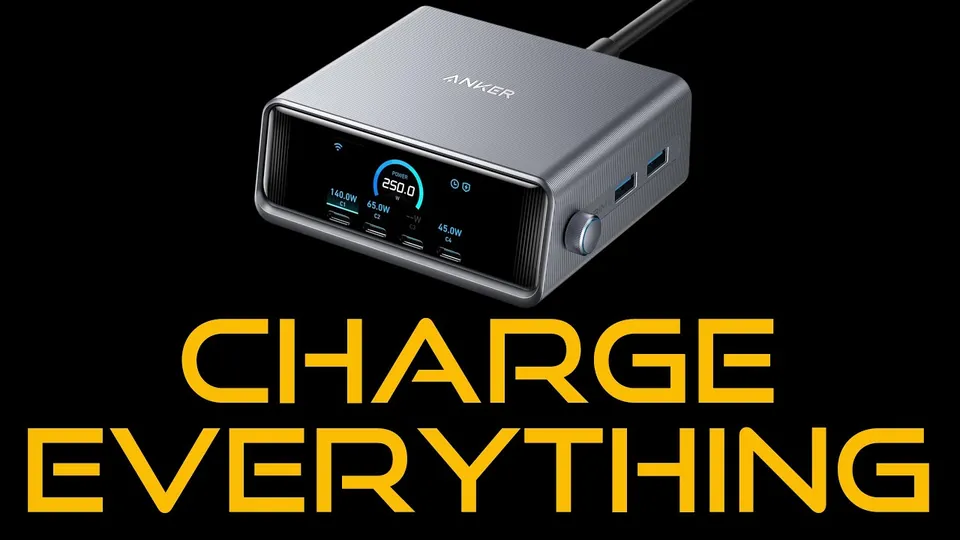
Anker's Prime desktop charging station is smaller than I expected, with four USB-C ports, two USB-A ports, four charging modes and a screen that shows exactly how many watts each port is pushing.

Jesse Nowlin
Founder, TABGEEKS · · 2 min read
This is the Anker Prime 250W desktop charging station, a charging headquarters for everything power hungry on my desk. Anker didn't sponsor this. I'm just a huge fan of their gear.
I'm constantly plugging in headsets, laptops, flashlights and batteries. When I get back from a job, a trip or the field, I run out of places to charge everything quickly so it is ready to go again. This is meant to solve that for my desk.
Prefer to watch? The full video is right here. 5:12 · Watch on YouTube
Jump to a section in the video
Smaller than I expected
Anker's pull tabs on the top and bottom make the box easy to open, and inside, the station comes wrapped in their nice paper with a black color scheme. My first reaction: it's tinier than I thought. It has a cool design on the top and sides and a very nice tactile scroll wheel.
Ports and controls
| Feature | Details |
|---|---|
| USB-C | Four ports on the front |
| USB-A | Two ports on the side |
| AC outlets | None |
| Control | Scroll wheel on the side, plus the app |
| Screen | Per-port and total wattage, optional clock screensaver |
| Power | Standard two-prong power cord |
I'll use the USB-A ports for things like my iPhone charging stand. The only thing missing is full-size outlets, and that's fine. I have plenty of those.
Four charging modes
The wheel on the side handles quick changes to port priority or charging mode. You can also control it wirelessly through the app.
Charging modes
| Mode | What it does |
|---|---|
| AI Power | Figures out what each device draws and gives it the right amount |
| Port Priority | Charges a chosen port, like a laptop, first and fast |
| Dual Laptop | Sends a large amount of power to two laptops at once |
| Low Current | Slow charging overnight |
In the box
Besides the station, there is an Anker graphic placard showing how it looks, charging status, basic knob controls, wired and wireless adjustment, Wi-Fi connection and clock screensaver options. You also get the power cord and the usual safety and regulatory sheets.
Watching the watts
Lately, I've been obsessed with tracking how much wattage goes into my devices. I've used a USB-C cable with a little screen to make sure my Mac charges as fast as it should, and the screens on my Anker power banks, which go with me everywhere. One showed 8.4 W from its C2 port charging the camera I was filming with.
The Prime station shows that for every port on its screen. When I plugged the camera in, it appeared with the watts going through that cable, alongside total consumption in the middle.
“It helps me sleep better at night knowing that my devices are charging the way that they're supposed to.”
That tells you whether you're using the right cable and whether a device is fast charging as it should. When nothing is charging, you can set a clock screensaver, though that needs the app and an internet connection.
Bottom line
The Anker Prime 250W desktop charging station cost $169.98 when I filmed this. If your desk is a mess of chargers, it puts four USB-C and two USB-A ports in a small footprint, lets you prioritize what charges first, and shows exactly what each port is delivering.
Gear in this story
- Anker Prime 250W Desktop Charging StationAmazon (opens in a new tab)
Some of these store links are affiliate links. If you buy through them, the channel may get a small commission at no extra cost to you. Affiliate disclosure
Related stories

DJI Osmo Nano unboxing and first look: a tiny camera with a lot in the box
Oct 1, 2025 · 4 min read
Aohi Starship 240W power bank review: laptop power in a soda can
Apr 2, 2025 · 3 min read

Don't film everything: my framework for covering tech conferences
Jun 12, 2026 · 6 min read
Jesse Nowlin
Founder of TABGEEKS, former IT Director and Google Developer Expert. I test networking and pro tech on real job sites, then write up what I find.
Join the community