

Home / Stories / UniFi + Networking
UniFi Flex 2.5G PoE hands-on: the small 2.5 GbE PoE switch I was waiting for
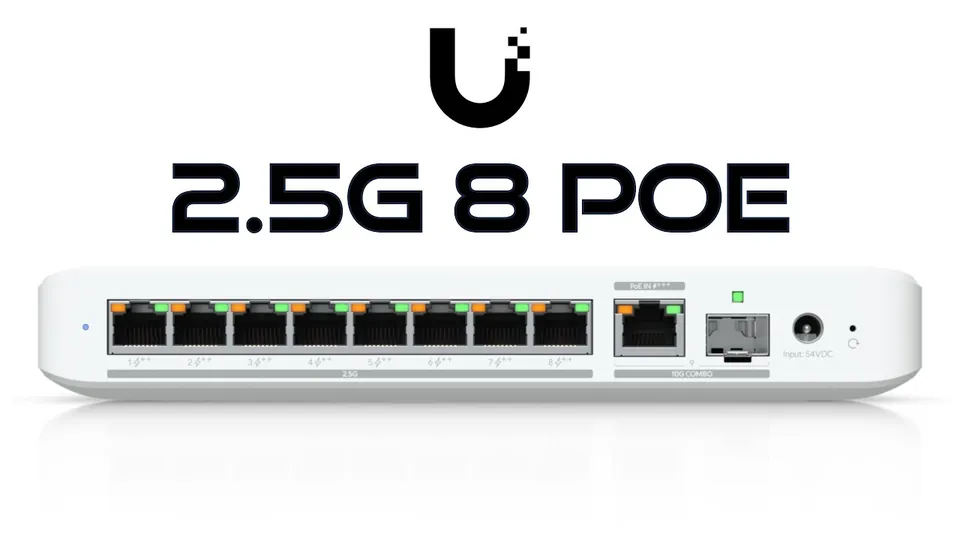
Ubiquiti's Flex 2.5G PoE fills a real gap: a small 2.5 GbE switch that actually outputs PoE. I installed it as my studio desk switch and ran it against 2 gig fiber.

Jesse Nowlin
Founder, TABGEEKS · · 3 min read
I'd noticed a gap in Ubiquiti's 2.5 gigabit switch lineup. There was the Flex Mini 2.5G, which is great, but it doesn't output PoE. If you wanted a small 2.5 GbE switch that could also power an access point or a couple of cameras, you were out of luck. Ubiquiti just filled that hole with the Flex 2.5G PoE.
I've been rebuilding my studio, and that includes overhauling the network around a Pro HD 24 PoE. What I still needed was a proper 2.5G PoE switch for my desk. I just upgraded to 2 gig fiber, my computer has 2.5 GbE, and my desk switch also powers my access point and a couple of cameras. This switch solves all of that.
The short version: for the price, it's a much better buy than the old Pro 8 PoE, and it's the desk switch I'd recommend for a 2.5 gig network.
Prefer to watch? The full video is right here. 5:08 · Watch on YouTube
Jump to a section in the video
What's on the switch and in the box
Up front you get eight ports, all 2.5 gigabit. The interesting one is the 10 gig combo uplink, which pairs an Ethernet port and an SFP. On the end there's an optional power input. Mine didn't come with the power brick, so I couldn't show it off, but plugging in direct power lets a lot more PoE run through the switch.
In the box you get the usual mounting screws and the mounting plate that anyone who has used Ubiquiti will recognize, plus a mounting template with a little level for putting it on a wall.
Install and speed test on 2 gig fiber
I swapped it in at my desk and hopped over to the test rack. The upload gave me a small heart attack starting off slow, but it settled at about 2.1 Gbps down and 2.3 Gbps up. I'm very happy with that on a 2 gig fiber connection.
Adoption was the normal UniFi routine: find it under Devices, adopt, let it update. Once it was up, the port view showed exactly what I had plugged in.
My desk setup on the Flex 2.5G PoE
| Port | What's plugged in |
|---|---|
| Port 1 | MacBook Pro, linked at 2.5 GbE |
| PoE out | USW Pro 8 PoE feeding other cameras |
| PoE out | U7 Pro Max access point |
| Uplink | USW Pro HD 24 PoE, which also powers this switch |
The switch takes PoE in from the Pro HD 24 PoE and passes PoE out to the devices on my desk.
The one surprise was the Pro 8 PoE linking at only gigabit. That makes sense once you look at it: the Pro 8 PoE is a gigabit switch. It doesn't matter here, since it only has cameras on it, but it's a good reminder of how the older switch compares.
How it compares on price
This is where the Flex 2.5G PoE really stands out. It's a little less rugged than the Pro 8 PoE, but it's faster and cheaper.
Prices I quoted at launch
| Switch | Price at launch | What you get |
|---|---|---|
| Pro 8 PoE | $349 | Gigabit ports, PoE+ output |
| Flex 2.5G | $159 | Eight 2.5 GbE ports |
| Flex 2.5G PoE | $199 | Eight 2.5 GbE ports, PoE++ output |
Prices as stated in January 2025. Check the store for current pricing.
One catch: if you want the full 196 W of PoE, you need to buy the additional AC power adapter. Without it, you're running off the power coming in from upstream.
The settings page
The device page is standard UniFi. You can see how much power you're using, the IP address and the parent device, which is always nice to have when you're tracing a network. There are some insights and the usual straightforward settings.
Bottom line
If you're building a 2.5 gig network and need PoE at the desk or in a small closet, this is the switch. It powers an access point and cameras, keeps your computer at full 2.5 GbE speed and adds a 10G combo uplink, all for less than the older gigabit Pro 8 PoE. It was set to launch at $199 on January 16, and if you plan to run a lot of PoE devices, budget for the power adapter too.
Gear in this story
- UniFi Switch Flex 2.5G PoESpecs and compare for UniFi Switch Flex 2.5G PoEUbiquiti Store (opens in a new tab)
- Switch Flex 2.5GSpecs and compare for Switch Flex 2.5GUbiquiti Store (opens in a new tab)
- Switch Flex Mini 2.5GSpecs and compare for Switch Flex Mini 2.5GUbiquiti Store (opens in a new tab)
- Switch Pro 8 PoESpecs and compare for Switch Pro 8 PoEUbiquiti Store (opens in a new tab)
- Switch Pro HD 24 PoESpecs and compare for Switch Pro HD 24 PoEUbiquiti Store (opens in a new tab)
- UniFi U7 Pro MaxSpecs and compare for UniFi U7 Pro MaxUbiquiti Store (opens in a new tab)
Ubiquiti Store links are affiliate links. If you buy through them, the channel may get a small commission at no extra cost to you. Affiliate disclosure
Related stories
UniFi Cloud Gateway Fiber: the Cloud Gateway Max with 10G and PoE
Feb 25, 2025 · 4 min read
UniFi Pro XG 10 PoE review: 10 GbE on every port, and the rest of the Pro XG lineup
Apr 28, 2025 · 3 min read

UniFi AI Port: adding face and plate recognition to older cameras
Dec 12, 2024 · 4 min read
Jesse Nowlin
Founder of TABGEEKS, former IT Director and Google Developer Expert. I test networking and pro tech on real job sites, then write up what I find.
Join the community