

Home / Stories / UniFi + Networking
UniFi Access 3.0 and the G3 Reader Pro: Touch Pass unlocks doors with your iPhone
UniFi Access 3.0 brings Touch Pass, tap your iPhone or Apple Watch and the door opens, no app and no unlock, even with a dead battery. I set up the new G3 Reader Pro and break down the lineup and the licensing.

Jesse Nowlin
Founder, TABGEEKS · · 3 min read
Drumroll, please. Ubiquiti just released the access control update we have been dreaming about and asking for for years: unlocking your door with your iPhone without opening an app or tapping anything. Welcome to UniFi Access 3.0.
Alongside it comes the next generation of readers, the G3 lineup. The one I had in house is the G3 Reader Pro, so I unboxed it, adopted it, turned on Touch Pass and walked up to the door. I also asked Ubiquiti about the Touch Pass pricing, because I knew you would all ask, and as an administrator it bothered me too.
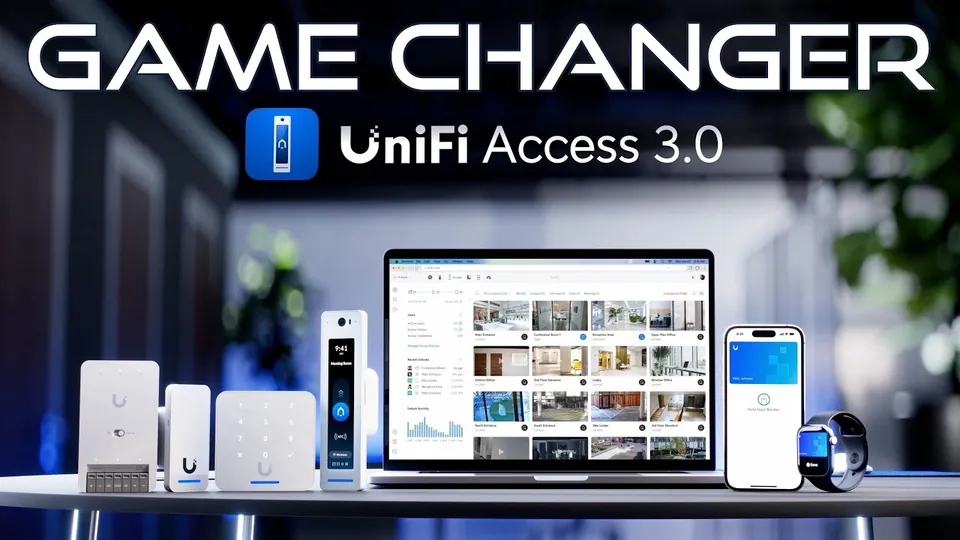
Prefer to watch? The full video is right here. 5:19 · Watch on YouTube
Jump to a section in the video
The G3 lineup
There are three readers. The G3 Reader is very similar to the G2 Reader but adds Touch Pass. The same goes for the G3 Reader Pro. The new one on the block is the G3 Reader Flex, an industrial rated keypad reader with key card access, and yes, it supports Touch Pass too. There is also a new mini hub that is 70 percent smaller than the existing Access Hub, and I can't wait to get my hands on it.
G3 reader pricing at launch
| Reader | Price | Notes |
|---|---|---|
| G3 Reader | $159 | Like the G2 Reader, plus Touch Pass |
| G3 Reader Flex | $199 | Industrial rated keypad and key card reader |
| G3 Reader Pro | $379 | Pro reader with Touch Pass |
Prices as stated in the video.
What Touch Pass does
Touch Pass is a new Ubiquiti system that, through a partnership with Apple, unlocks your door with your iPhone or Apple Watch. You don't log in to an app, and you don't even unlock your phone. Just tap and go. It works even when your iPhone is dead, thanks to the power reserve in iOS and watchOS that keeps enough energy for things like Find My and, now, Touch Pass.
Unboxing and setup
On top is the installation guide. On the back is a foam backing and a plastic grommet. Remove it and run your cable through to keep water out. The front looks just like the previous generation but has a lot more power under the hood. You also get the mount, the mounting template, three screw options, the security key and a gang box mount cover. As I understand it, it is a direct lift and shift from an existing G2, and I will test that on a corporate office install.
It showed up ready to adopt as UA G3 Pro. As soon as I updated it, I got the prompt to enable Touch Pass. The user receives a welcome email inviting them to the site. From there you add Touch Pass to Apple Wallet. Express mode works without Face ID or a passcode: hold your iPhone or Apple Watch near the reader. After the updates finished, I tapped and got the welcome. Bingo.
“This is the stuff that we've been dreaming about and asking for for years and today it's finally here.”
What Touch Pass costs, and why
You get 10 free Touch Pass licenses for the first year, which Ubiquiti pays Apple for. After that, it is $5 per person per year, and each license covers two devices, your phone and your watch. The fee exists because Apple charges $5 per person per year for the service, since it runs through Apple's transaction network.
Ubiquiti told me it is just passing along Apple's cost. Its no licensing fees strategy isn't changing, and it is losing money in year one to give everyone those free licenses. Other companies doing this charge far more.
Bottom line
Access 3.0 and the G3 readers deliver the feature UniFi Access users have wanted most: tap and go entry with an iPhone or Apple Watch, even on a dead battery. The G3 Reader is $159, the G3 Reader Flex $199 and the G3 Reader Pro $379, all available now, and Touch Pass costs Apple's pass-through $5 per person per year after the free first year. Ubiquiti sent the Reader Pro for review.
Gear in this story
- Access G3 Reader ProSpecs and compare for Access G3 Reader ProUbiquiti Store (opens in a new tab)
- Access G3 ReaderSpecs and compare for Access G3 ReaderUbiquiti Store (opens in a new tab)
- Access G3 Reader FlexSpecs and compare for Access G3 Reader FlexUbiquiti Store (opens in a new tab)
- Access Door Hub MiniSpecs and compare for Access Door Hub MiniUbiquiti Store (opens in a new tab)
Ubiquiti Store links are affiliate links. If you buy through them, the channel may get a small commission at no extra cost to you. Affiliate disclosure
Related stories

UniFi AI Port: adding face and plate recognition to older cameras
Dec 12, 2024 · 4 min read

UniFi Device Bridge IoT review: a $49 fix for wired-only devices
Nov 20, 2025 · 3 min read
How to connect Starlink V5 directly to a UniFi network, no router needed
Aug 3, 2026 · 4 min read
Jesse Nowlin
Founder of TABGEEKS, former IT Director and Google Developer Expert. I test networking and pro tech on real job sites, then write up what I find.
Join the community