

Home / Stories / UniFi + Networking
UniFi Talk 3.0: the new G3 phones, a cordless handset and Talk Relay
Ubiquiti refreshed its Talk phone lineup with three G3 Touch phones and a cordless handset, and Talk Relay lets the phones work with third-party PBX systems. Here's what's new and what it cost at launch.

Jesse Nowlin
Founder, TABGEEKS · · 4 min read
UniFi Talk is one of the lesser-known parts of the Ubiquiti ecosystem, and honestly one of my favorites. It's Ubiquiti's self-hosted phone service, and with Talk 3.0 it just got a full hardware refresh: three new G3 Touch phones and, for the first time, a cordless handset.
Ubiquiti sent me the G3 Touch Pro and the G3 Wireless Handset, so I unboxed them, adopted the phone in the Talk interface and dug into the other big announcement, Talk Relay. That one matters more than it sounds. It opens Ubiquiti's phones up to a long list of third-party PBX providers instead of locking you into Talk.
Bottom line up front: if you already run UniFi, these phones are the easiest way to put a desk phone on the same platform as your network, cameras and doors. And if you don't want Talk itself, Relay means you can still use the hardware.
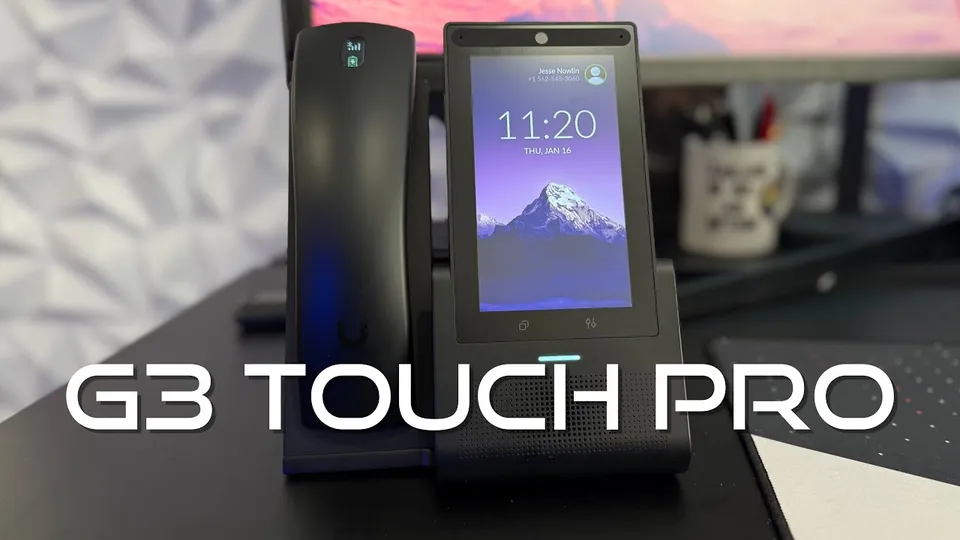
Prefer to watch? The full video is right here. 4:49 · Watch on YouTube
Jump to a section in the video
The G3 Wireless Handset
Yes, it's cordless. The handset works with all three of the new G3 Touch phones. It has a power button on the side, volume rockers and a small screen on the back. Ubiquiti calls out low-latency, high-definition audio, two-way communication, a small display for battery life and signal strength, and a rechargeable lithium-ion battery for extended use.
For an office where people walk around while they talk, or a front desk that gets pulled away constantly, a cordless handset tied to the same phone is a big quality-of-life upgrade over the previous generation.
G3 Touch Pro hardware
The G3 Touch Pro has a 5 inch touchscreen. Ubiquiti moved the privacy shutter for the camera to the top of the phone and built it directly into the housing, instead of the stick-on shutter the last generation used. It's a small detail, but it looks a lot cleaner on a desk.
It still ships with a traditional corded handset with a mute button in the middle, so anyone who has used a desk phone will feel right at home. There's a high-performance speakerphone, and it's powered by PoE, so one cable handles power and data.
More than just a phone
The thing I've always loved about Ubiquiti's phones is that they run much more than the phone app, and that's still true here. Tap the app switcher and you can jump into Protect or Access. I tapped Access, picked the door behind me and unlocked it right from the phone. Switch to Protect and you get a live stream of your cameras on the screen.
That's useful for the person who doesn't keep the UniFi app open on a computer all day but wants to check a camera or buzz someone in now and then. And at the end of the day it's still a phone, so all the regular phone functions are there too.
“The Talk platform is super simple, easy to manage, and is seamlessly built into the rest of the UniFi platform.”
Talk Relay opens the platform to other PBX providers
The other big announcement is Talk Relay. It lets you use a standalone Ubiquiti phone with lots of existing PBX systems, and it controls the phones through Ubiquiti's official cloud hosting option. This is a big change for UniFi Talk, because Ubiquiti is opening up the platform instead of requiring Talk on the back end.
At launch, the verified compatibility list included FreeSwitch, Asterisk, CallCentric, VoIP.ms, Nextiva, 3CX and RingCentral. Microsoft Teams, Vonage for Business and Zoom were listed as in progress and coming soon. I'm looking forward to testing those once they're available.
Talk Relay pricing at launch
| Plan | What you get |
|---|---|
| 30-day free trial | For anyone who hasn't used it before |
| $29 a month | Up to 100 devices |
| $99 a month | Up to 1,000 devices |
Pricing as announced in January 2025. Check Ubiquiti for current plans.
Adopting the phone in Talk
Once I jumped into the Talk interface, the new UTP G3 Touch Pro showed up as detected. I added it, assigned it to myself, and it pulled down a quick firmware update while applying settings.
From there it'll look familiar to anyone who has managed Ubiquiti phones before. You get the extension, phone number, who it's assigned to and the call history, plus a settings menu to reassign, update, restart or remove the phone. It even shows which switch the phone is plugged into, which is handy when you're troubleshooting a desk.
Launch prices and availability
The G3 lineup at launch
| Device | Price at launch | Availability |
|---|---|---|
| G3 Touch Pro | $199 | Available at launch |
| G3 Touch Enterprise | $299 | April 2025 |
| G3 Touch Wall | $399 | April 2025 |
| G3 Wireless Handset | $99 | February 2025 |
As announced in January 2025. Prices change, so check the store.
Bottom line
If your business already runs UniFi, Talk 3.0 is a solid reason to put phones on the same platform as everything else. The setup is simple, the phones double as a window into Protect and Access, and the cordless handset fills the biggest gap in the old lineup. Talk Relay is the bigger story long term, because it means the hardware is worth a look even if you're staying with your current PBX provider.
Gear in this story
- Phone G3 Touch ProSpecs and compare for Phone G3 Touch ProUbiquiti Store (opens in a new tab)
- G3 Wireless HandsetSpecs and compare for G3 Wireless HandsetUbiquiti Store (opens in a new tab)
- Phone G3 Touch EnterpriseSpecs and compare for Phone G3 Touch EnterpriseUbiquiti Store (opens in a new tab)
- Phone G3 Touch WallSpecs and compare for Phone G3 Touch WallUbiquiti Store (opens in a new tab)
Ubiquiti Store links are affiliate links. If you buy through them, the channel may get a small commission at no extra cost to you. Affiliate disclosure
Related stories

UniFi AI Port: adding face and plate recognition to older cameras
Dec 12, 2024 · 4 min read

UniFi Device Bridge IoT review: a $49 fix for wired-only devices
Nov 20, 2025 · 3 min read
How to connect Starlink V5 directly to a UniFi network, no router needed
Aug 3, 2026 · 4 min read
Jesse Nowlin
Founder of TABGEEKS, former IT Director and Google Developer Expert. I test networking and pro tech on real job sites, then write up what I find.
Join the community