

Starlink V5 hands-on: smaller, lighter and half the power of the V4
The fifth-generation Starlink dish weighs 2.4 lb and caps out at 50 W. I unboxed it, set it up, ran speed tests and stacked it against the V4, the Mini and the High Performance dish.

Jesse Nowlin
Founder, TABGEEKS · · 5 min read
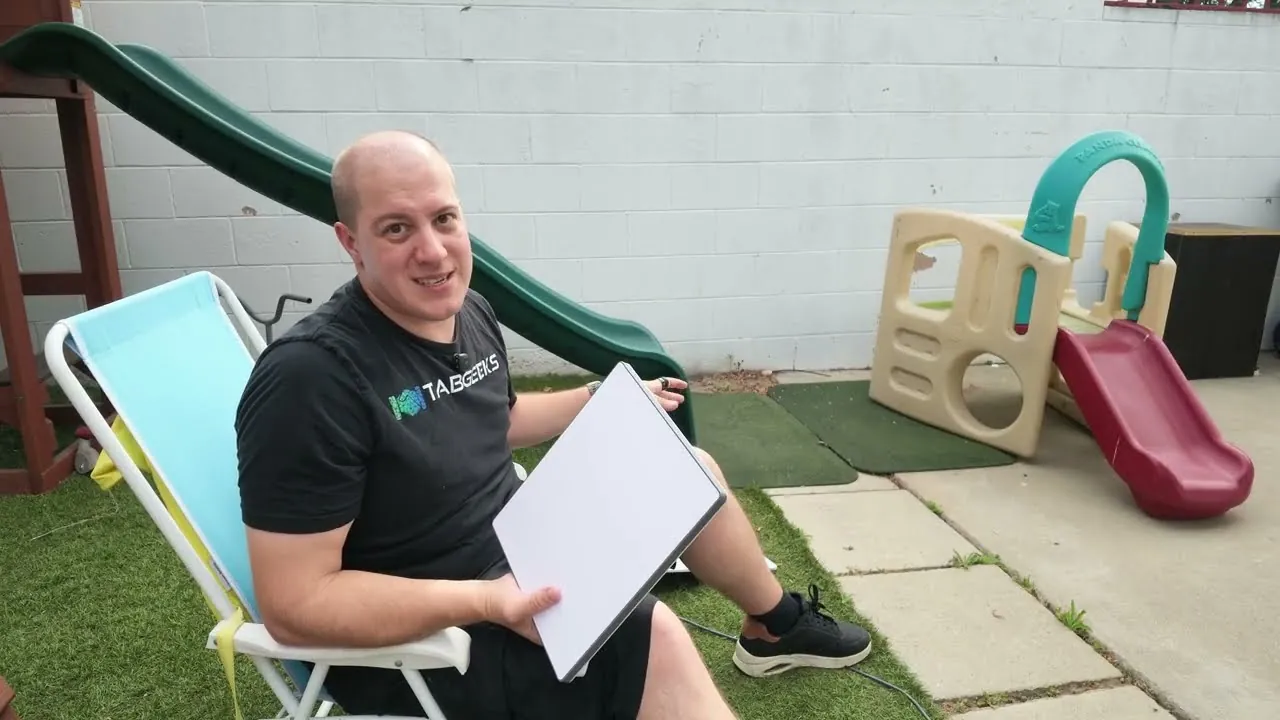
The Starlink V5 is here, and the first surprise was the box. It is way smaller than the one the V4 came in. The dish inside is smaller, thinner and lighter than any Starlink dish I have ever held, including the Mini. Honestly, I would rather carry this one on the go than the Mini.
I unboxed it, set it up outside, ran speed tests, and lined it up against the dishes I already own: the V4, the Starlink Mini and the big High Performance dish. The bottom line: if you are buying a new dish or installing at a new site, get the V5. If you already have a V4 on your roof and power draw doesn't bother you, there is not much reason to switch.
Prefer to watch? The full video is right here. 24:17 · Watch on YouTube
Jump to a section in the video
What's in the box
The kit is neatly arranged. You get the dish with a built-in kickstand, a 50 ft Starlink cable with the same waterproof proprietary connector as the other dishes, a power brick, a power cable with a standard two-prong plug on the US kit, a shorter cable to power the router, the tiny Router Mini with a metal stand, a new pole mount, and the usual double-sided getting started guide.
The pole mount has a nice touch I hadn't seen before: an Allen wrench stored in a bay in the bottom, plus two screws where the pole connects for extra stability. The kickstand lifts out with almost no effort. It is like a child's toy, in a good way.
On the back there is just one Ethernet port. The label reads model UTA-262, input 57 volts, and the dish is rated IP67 and Type 4 for water resistance.
V5 vs V4: size and weight
Next to the V4, the current dish Starlink ships with new service and the one in stores, the V5 is comical. The V4 was already a step forward, thinner and lighter without the motorized array, but the V5 is easier to hold, handle and mount in one hand. It is lighter and slimmer than the Mini too.
Starlink V5 vs V4
| Spec | V4 | V5 |
|---|---|---|
| Dish weight | 6.4 lb (2.9 kg) | 2.4 lb (1.1 kg) |
| Footprint | Baseline | 48% smaller |
| Peak download | 400+ Mbps | 375+ Mbps |
| Max power draw | 100 W | 50 W |
| Pipe adapter included | No | Yes |
| In-motion use | No | No, use the Mini |
As stated in the video, from Starlink's figures and my own unit.
The weight cut is about 62%. That is the difference between wrestling a dish up onto a pole and doing it one-handed. The V5 is plastic or polycarbonate, not metal, so it won't be as rugged as the High Performance dish, but that dish is built for things like cruise ships. For popping a dish on the roof, the V5 is perfect.
Setting it up
Indoors, I plugged the power brick into the wall, ran the 50 ft cable out to the dish and connected the Router Mini. The brick has LEDs that flash on power, and the waterproof end of the cable plugs into the brick. Outside, I threaded the cable through the kickstand, watched for the white LED blinking through the bottom of the dish, and pointed it at the northern sky with part of my house in the way.
The QR code in the guide goes to setup.starlink.com. Since I own a few Starlinks, I used "Set up another Starlink" in the app's settings and picked Starlink V5 at the bottom of the list. It found my location, downloaded a software update, and told me "Starlink aligned. No adjustment is necessary for best performance."
The Router Mini and mesh
I know people will ask, so I compared the router in the box with the Router Mini I bought from the store as soon as it went on sale. Both are model UTR251, and both can be powered over PoE or regular wired power. They are not quite identical, though. The new one labels its ports 1 and 2, while the store version has one port for the network and one for the dish, and the store version comes with its own power supply.
You can mesh these routers to extend the network if you want to keep everything on the Starlink side. I go Ubiquiti instead. Remember that unlike the Mini, the V5 has no built-in Wi-Fi, so you need a router unless you plug one device straight in and configure it yourself.
Real-world speed and power
My phone, on the router about 30 ft away in my studio through several walls, was on 5 GHz. A test straight to the router showed 300 Mbps down, so distance wasn't the bottleneck. Through the dish, while it was still acclimating, I went from 75 Mbps to 175 and then climbed to about 190 Mbps. I didn't quite hit 200 on that run, but that is fantastic for a dish sitting on the grass on day one.
Power was the number I get asked about most. During setup it averaged about 19 W. With the Router Mini attached, the average was 20 W with spikes to 30 to 35 W, against a 50 W ceiling. The V4's ceiling is 100 W. For your house electric bill, and especially for solar, battery or off-grid setups, that matters.
One warning: the LEDs on the power brick are very bright. If it lives in a bedroom, put some electrical or gaffer's tape over them.
Weather rating and the Mini question
The V5 is rated IP67 and Type 4, operates from -22° F to 122° F, and is rated for winds up to 165 mph (265 kph) when properly mounted. Snow melt is similar to the V4.
It is not built for in-motion use. For a car, boat or anything moving, stick with the Mini, which also has Wi-Fi built in and runs nicely off a battery pack.
“If you're getting a new dish or you're installing this at a new site, 100% get this over the V4.”
Should you upgrade?
If your V4 is on your house and the power draw, literally twice the new dish, doesn't bother you, no. Why bother? Whatever you save on energy you would spend on the new dish. If you run on solar or batteries, need portability, or want an emergency kit, the V5 makes a lot of sense. If you own anything older than the V4, absolutely upgrade.
When I checked all 50 states and DC at filming time, you could only order it in Idaho, Montana and Oregon. Starlink told me this will be their new mass production dish, so going forward it is the one you will see everywhere. Tesla also announced the V5 is being built into the production Cybertruck.
Bottom line
It is everything I have come to expect from Starlink: a solid, waterproof dish that connected without great sky coverage and was getting close to 200 Mbps out of the box, in a package that is much smaller and uses half the power at its peak. Next, it goes on the roof, and then up to a 400 acre site in the San Diego mountains that has run on Starlink since the first generation.
Gear in this story
- Starlink service, 1 month free with my referralstarlink.com (opens in a new tab)
- Heavy-duty protective travel case for Starlink V4Amazon (opens in a new tab)
- Starlink Mini storm caseAmazon (opens in a new tab)
Some of these store links are affiliate links. If you buy through them, the channel may get a small commission at no extra cost to you. Affiliate disclosure
Related stories
DJI Osmo Nano unboxing and first look: a tiny camera with a lot in the box
Oct 1, 2025 · 4 min read
Aohi Starship 240W power bank review: laptop power in a soda can
Apr 2, 2025 · 3 min read

Don't film everything: my framework for covering tech conferences
Jun 12, 2026 · 6 min read
Jesse Nowlin
Founder of TABGEEKS, former IT Director and Google Developer Expert. I test networking and pro tech on real job sites, then write up what I find.
Join the community