

Home / Stories / UniFi + Networking
UniFi Device Bridge: wireless PoE for a camera with no cable run
The UniFi Device Bridge works like a PoE injector that gets its network over Wi-Fi instead of a cable. I used it to put a camera on a pole about 100 ft from the house without digging up a patio.

Jesse Nowlin
Founder, TABGEEKS · · 3 min read
I wanted to mount a camera on a pole in my backyard. The problem: the house is about 100 ft away, and there's a concrete patio in between. I have Wi-Fi out there, but I didn't want to dig up concrete just to run one cable.
That's exactly what the new UniFi Device Bridge is for. Think of it as a PoE injector that doesn't need a network cable on the input side. It connects to your Wi-Fi and then provides both network and power to whatever you plug into it. I set it up, adopted it and hung a camera off it.
It isn't only for cameras, either. A PoE desk phone, IoT equipment or anything else that needs a connection where you don't want to run a cable is fair game.
Prefer to watch? The full video is right here. 3:36 · Watch on YouTube
Jump to a section in the video
What's in the box
Inside you get the getting started guide, a power cable, the Device Bridge itself and the usual Ubiquiti mounting hardware, mounting template and wall mount. Interestingly, there's also an extended antenna in the box that screws onto the top of the device, the same way it does on other Ubiquiti gear.
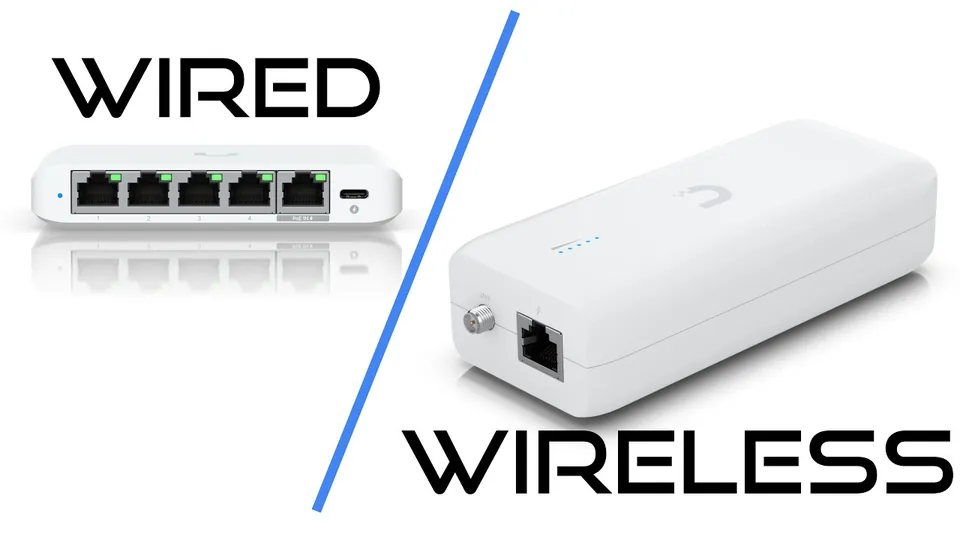
On top there's a 1 GbE Ethernet port and the antenna connection. The front has a signal strength indicator and the Ubiquiti logo. On the bottom is a normal power input.
How it differs from a normal PoE injector
What you won't find is the second network port. A normal PoE injector takes network in on one side and sends power and network out the other. Here, network comes in over Wi-Fi, through the internal antenna or the optional external one, and network plus power come out of the top port. You plug your device into the top, plug the bottom into power, and you're done.
The external antenna is optional. You don't have to use it if your signal is fine without it.
Adoption and setup
As soon as it had power, the light came on and it started connecting. UniFi found the new device, I named it and adopted it, and a few minutes later it had finished updating and was ready to go.
One important note: this is an indoor, non-waterproof device. I was standing outside for the setup, but it's going into an outdoor weatherproof box to protect it. Ubiquiti, if you come out with an outdoor version of this one, and I don't mean the Device Bridge Pro, I'd be very happy.
“This is essentially an interesting new device that's going to be a PoE injector, but instead of needing network via a cable, it will attach directly to my Wi-Fi.”
Connecting the camera
With a UniFi camera plugged in and mounted on the pole, it showed up in the device menu right away. It reports full Ethernet, but that's a limit of the camera, not of the Device Bridge's throughput.
Over in Protect, the camera popped up and I hit Add. If a camera stops responding right after you plug it in, it's probably updating. Give it a minute. Once the update finished, the feed came up with almost zero latency and nice, high-quality 2K recording.
Device Bridge at a glance
| Spec | As stated |
|---|---|
| Throughput | Up to 867 Mbps |
| PoE output | Up to 15 W |
| Wired port | 1 GbE |
| Price at launch | $99 |
Figures as stated in November 2024.
Bottom line
If you have Wi-Fi coverage where you need a device but no practical way to run a cable, the Device Bridge is a clean fix. It got my camera online on a pole about 100 ft from the house, no trenching, with smooth 2K video. Just remember it's an indoor unit, so plan on a weatherproof box if it's going outside, and keep the 15 W power limit in mind for anything bigger than a camera.
Gear in this story
Ubiquiti Store links are affiliate links. If you buy through them, the channel may get a small commission at no extra cost to you. Affiliate disclosure
Related stories

UniFi AI Port: adding face and plate recognition to older cameras
Dec 12, 2024 · 4 min read

UniFi AI Turret review: 4K, plate and face recognition, and microSD edge recording
Dec 13, 2024 · 4 min read

UniFi Device Bridge IoT review: a $49 fix for wired-only devices
Nov 20, 2025 · 3 min read
Jesse Nowlin
Founder of TABGEEKS, former IT Director and Google Developer Expert. I test networking and pro tech on real job sites, then write up what I find.
Join the community