

Home / Stories / UniFi + Networking
UniFi PowerAmp first look: Ubiquiti's high fidelity amp and the UniFi Play app
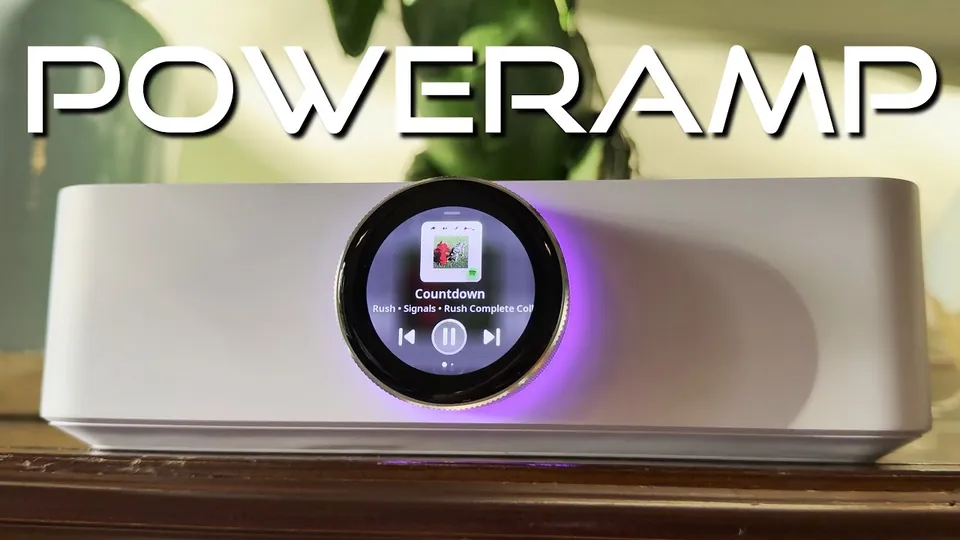
Ubiquiti made an amplifier. The UniFi PowerAmp has a touchscreen volume knob, HDMI eARC with Dolby Atmos and two Ethernet ports for daisy chaining, and it works without any other UniFi gear.

Jesse Nowlin
Founder, TABGEEKS · · 3 min read
It's not every day Ubiquiti releases a new product, never mind one for the living room. This is the UniFi PowerAmp. I was so excited to unbox it that I forgot to hit record, so it has been up on my shelf for a while, and I'm really enjoying it.
Ubiquiti sent it over to review. Here I set it up out in the open with my existing speakers and walk through the new UniFi Play app. A rack install wired to overhead speakers is coming next.
Prefer to watch? The full video is right here. 7:25 · Watch on YouTube
Jump to a section in the video
The hardware
On the front is a 1.43 inch rotary knob with a touchscreen. The knob controls volume, and the touchscreen can control certain settings, as on other Ubiquiti gear. A Ubiquiti logo sits on top, and the sides are bare.
UniFi PowerAmp rear panel
| Connection | Details |
|---|---|
| Ethernet | Two gigabit ports for daisy chaining |
| Speaker outputs | Two terminals, with two custom banana plugs included |
| Subwoofer | One RCA analog output |
| Analog in | Two RCA inputs, left and right |
| HDMI | One eARC input with Dolby Atmos |
The two Ethernet ports let you daisy chain several PowerAmps from one network connection instead of adding a switch. You could use a switch, but it is nice to have the option, especially when these replace audio gear that has been in a rack for a while.
No UniFi network required
You don't need existing Ubiquiti infrastructure. The PowerAmp is a standalone device that pairs with your phone over Bluetooth and connects over Wi-Fi or Ethernet. No UniFi console or other hardware required.
I connected it to my existing shelf speakers. The custom banana plug, with red and black dots, went onto my existing speaker cable and clicked nicely into the back.
Setup in UniFi Play
You need the new UniFi Play app. It found the PowerAmp right away. I hit setup, entered my Wi-Fi password and gave it a minute. I used Wi-Fi because there is no Ethernet on that shelf, and my Wi-Fi is pretty good there.
The app has a volume slider that moves the display on the amp, and an audio source picker for streaming, HDMI eARC or line in. A tooltip with a great animation shows what plugs in where, which is a very nice addition. Then come Dolby Atmos setup and an equalizer with custom, music, movie and night presets.
Dynamic boost lifts the low and high frequencies to match how ear sensitivity changes at low volume, which is a nice touch. You also get left and right balance, stereo or mono, a persistent dashboard option that keeps the dashboard on the display during streaming, and controls for screen brightness, ring brightness and color. I went green to match the dragon on my shelf.
Locate plays a sound over the speakers, flashes the LED and puts the Ubiquiti U on the screen. Restart and remove are there too.
The sound test
In Spotify, I selected the PowerAmp and played my favorite band, Rush. Volume works from the computer, from the phone's volume buttons, which bring up a PowerAmp indicator, or from the app, and the amp's screen updates each time. The app also showed the Spotify track.
“I have been using it up on the shelf here for quite some time, and I have to say I'm really enjoying it.”
For multiple speaker zones, you can group up to 32 PowerAmps, with an unlimited number of groups. Ubiquiti rates it at up to 130 watts per channel at 8 ohms, or 260 watts per channel at 4 ohms.
Bottom line
The UniFi PowerAmp cost $599 at launch, in black or white. It is a clean, easy to set up amplifier with HDMI eARC and Dolby Atmos, a great touchscreen knob and a polished app, and it doesn't require a UniFi network. If you're planning multi-room or rack audio, the daisy chain Ethernet and grouping make it even more interesting.
Gear in this story
Ubiquiti Store links are affiliate links. If you buy through them, the channel may get a small commission at no extra cost to you. Affiliate disclosure
Related stories

UniFi AI Port: adding face and plate recognition to older cameras
Dec 12, 2024 · 4 min read

UniFi Device Bridge IoT review: a $49 fix for wired-only devices
Nov 20, 2025 · 3 min read
How to connect Starlink V5 directly to a UniFi network, no router needed
Aug 3, 2026 · 4 min read
Jesse Nowlin
Founder of TABGEEKS, former IT Director and Google Developer Expert. I test networking and pro tech on real job sites, then write up what I find.
Join the community