

Home / Stories / AI at work
How a studio makes a near Pixar level short with Veo, Lyria and Nano Banana in ComfyUI
What can AI do beyond a chatbot? For media teams, quite a lot. A Google Cloud solution architect walked me through how a team of traditional artists built a cinematic short, from character casting to the final score.

Jesse Nowlin
Founder, TABGEEKS · · 4 min read
One question I get all the time is what AI can actually do besides being a chatbot. This is part of my series looking at how specific industries can apply Google's generative tools, and this one is for media folks and producers. Pay attention.
Brendan, a solution architect at Google Cloud, broke down a short film made by Greenfield, a group of traditional artists working between Google DeepMind and Google Cloud. They use traditional filmmaking tools and AI to accelerate their workflow. His point up front: these tools are not toys anymore. They are being used in professional productions. He walked it through the same stages a production studio would, using ComfyUI to drive Google's APIs.
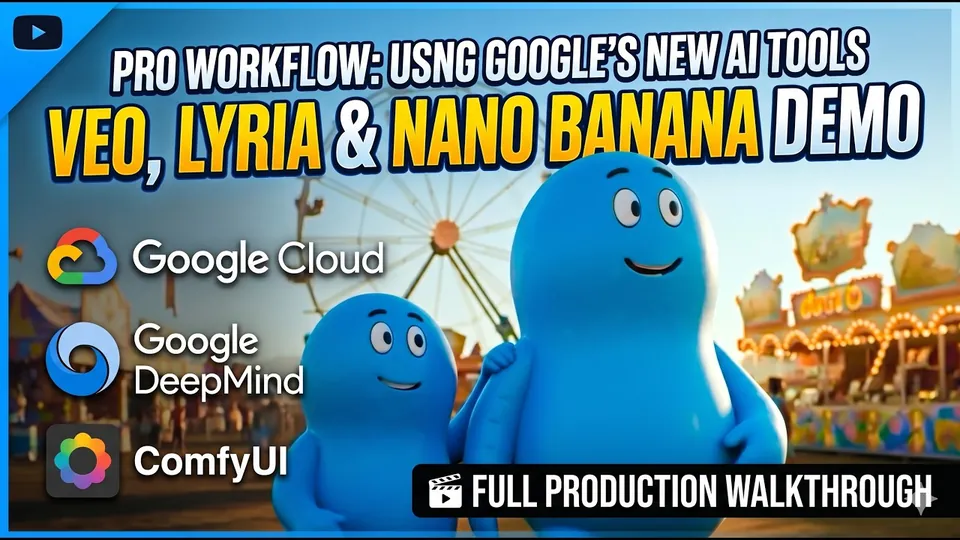
Prefer to watch? The full video is right here. 11:19 · Watch on YouTube
Jump to a section in the video
Why ComfyUI
There are many ways to reach Google's APIs, but Brendan likes ComfyUI because it handles Google's models well and lets you mix and match with other models if you want. Everything in the demo was laid out as connected steps in that interface, so you could see how the references flow from one stage to the next.
Casting characters with Nano Banana and a character bible
Like a real production, it starts with casting. Google publishes prompting best practices, and the team followed them: describe the cinematic intent, the actors, the environment and the plot. Nano Banana handles stills, like character references and storyboard first frames. Veo handles performance.
Prompting alone gets you a lot of options, but the faster route is to let an artist drive. Nano Banana accepts up to 15 reference images. In this case, a sketchbook artist defined the scale, profile and look of each character, and Nano Banana handled the textures and lighting, which is the slow part. Sketches are quick to iterate. Final looks take much longer by hand.
Once the final characters were picked, they became locked references. Using Nano Banana and Veo's character consistency features, the team built what Brendan called a character bible: the same character from novel angles, doing new things. In the story, one of the inflatable characters deflates, and they needed to see what that looks like.
The trick is that if something is already in the image, you do not have to prompt it again. You prompt only for performance. Google has done a lot of work on physics in Veo, and Brendan pointed out that getting a character to wrap around something in its environment in 3D modeling software is a time-intensive process. Here it is a prompt.
Props, environments and storyboards in parallel
In professional film, multiple teams work at once. The props team builds props with the same techniques, while the environment team figures out the setting. Using references, you can combine an environment image with an artist's drawing that says where the camera should sit, then ask for a photorealistic version.
Then comes the storyboard phase. Nano Banana combines the props, characters and scene into the first frame of each shot. Brendan showed the same character under different lighting environments, still clearly the same character, which is the consistency that makes the rest possible.
Shot production with fine control
For each shot, the references go into a Nano Banana prompt to make the first frame, and that frame goes into Veo with a simple performance prompt. You can supply first and last frames for more control, and with up to 15 reference images, even first, middle and last.
Brendan's rule of thumb is that 20% of the time gets you 80% of the way, and the rest is fine detail. So the workflow is built for granular changes. They liked one scene but wanted to boom up, tilt down and zoom out, so they regenerated the first frame and reran the saved Veo prompts. For a sadder beat, they went for a shallower depth of field with the foreground out of focus to make you feel the deflation. They even changed two characters from friends to a father and son to make the story more dynamic.
A full soundtrack from Lyria in one pass
The finished piece runs about three minutes. Veo can generate sound effects and dialogue in multiple languages, but this short has no dialogue, so the score came from Lyria. In Vertex AI Studio, Brendan loaded the final video and gave Gemini a simple prompt: break this three-minute video into chapters, find the highlight moments, and suggest the sound flourishes you would want to hear.
Gemini returned the style, no voiceover, plus sentiment and intensity broken down by time code. That analysis went into Flow Music to generate the track. That integrated stack, where Google's models analyze the video and write the prompt for the next model, is the real strength here.
The result was created in one pass. It even put in a pause for effect. A lone cello comes in for the depressing moment when the character starts to deflate, and at the end, as he walks the lonely streets of Los Angeles looking for a fix, a lone trumpet plays before it fades to black. It was a bit of a tearjerker.
Bottom line
This is what AI looks like when artists stay in control. Sketches and art direction come from people. Nano Banana and Veo handle consistency, lighting and physics. Gemini and Lyria handle the score. If you are a producer, director or traditional artist wondering where AI fits, this workflow is a strong place to start.
Gear in this story
- Google DeepMind Veo and Lyria in AI Studioaistudio.google.com (opens in a new tab)
- Google Gen AI prompting best practicesdocs.cloud.google.com (opens in a new tab)
Some of these store links are affiliate links. If you buy through them, the channel may get a small commission at no extra cost to you. Affiliate disclosure
Related stories
Shadow IT on steroids: how to govern AI agents at work
Oct 7, 2026 · 7 min read
Your IT stack is bloated: how to simplify and secure it for 2026, with Promevo's Colin McCarthy
Dec 2, 2025 · 7 min read
What is Meta Muse? A week with Meta's new personal AI agent
Sep 23, 2026 · 6 min read
Jesse Nowlin
Founder of TABGEEKS, former IT Director and Google Developer Expert. I test networking and pro tech on real job sites, then write up what I find.
Join the community