

Home / Stories / UniFi + Networking
UniFi PoE Audio Port review: the PowerAmp minus the amp
Ubiquiti's PoE Audio Port is the PowerAmp's smaller sibling, minus the amplifier. I paired it with an 1,100 W powered speaker and tested zones, announcements and Spotify.

Jesse Nowlin
Founder, TABGEEKS · · 4 min read
Ubiquiti recently released, essentially, the PowerAmp minus the amp. So naturally, I grabbed a big amplified speaker to test it with. This is the UniFi PoE Audio Port, the newly announced little sibling to the PowerAmp. It is smaller than a Mac Mini and significantly smaller than its big brother.
The main difference is that the Audio Port is built for setups that don't need an amplifier, either because you already have one or because your speakers have one built in. I paired it with an 1,100 W powered speaker, set it up in UniFi Connect, put it in a zone with my PowerAmp, and streamed Spotify to both. It is a really easy to use, great streamer, with two features on my wishlist.
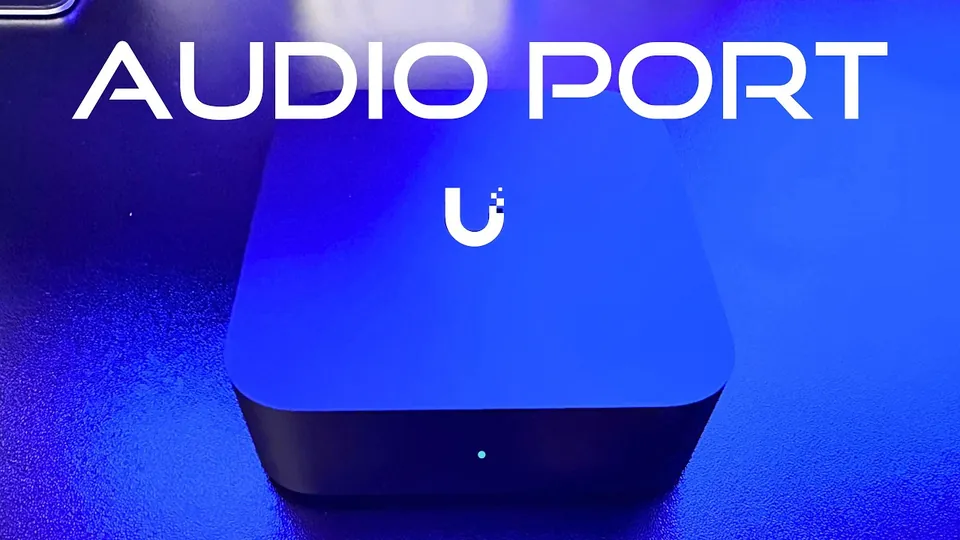
Prefer to watch? The full video is right here. 10:48 · Watch on YouTube
Jump to a section in the video
Active vs passive speakers, in plain terms
There are generally two types of speakers. Passive speakers take exactly the signal they are given and make sound. The problem is that streamers, turntables and similar sources put out a weak signal called line level. To crank that up, you need an amplifier stage to bring the level high enough for clear, loud sound, and that box often doubles as a source switcher, volume knob or streamer.
The PowerAmp handles all of that, so you can plug passive speakers straight into it. An active speaker, like this 1,100 W PA speaker, already has the amplifier built in, along with its own inputs and volume controls. PA, interestingly, doesn't stand for anything to do with amps. It means public address, as in concerts or schools. With an active speaker, you plug in the Audio Port, power it over PoE, and you are done.
Ports and what's in the box
PoE Audio Port connections
| Connection | Details |
|---|---|
| Power and network | PoE in on Ethernet, or the included barrel power adapter |
| Digital audio | Optical in and optical out |
| TV | HDMI eARC |
| USB | USB-C audio in |
| Analog | Left and right audio in, left and right audio out |
The included power brick uses a barrel connector, not USB-C. The USB-C port is for audio in.
Setup and the app
The app found the new device, setup succeeded fast, and it pulled an update. If you have seen the PowerAmp interface, it is basically the same. Sources include streaming, eARC, line in, S/PDIF and USB-C. Outputs include line out, S/PDIF and USB-C. You also get an equalizer, sound balance and channels, device volume and volume limits, plus manual firmware update, locate, restart and remove.
Zones: mix the Audio Port and PowerAmp
On the Zones tab, you can put the Audio Port and the PowerAmp in the same zone. I created one called "Turn it up!" You can make it zone-only, so you can only play to the whole zone, or allow playing to the zone or to individual devices. Ubiquiti's animation on the volume slider is really well done.
There is also an announcement feature I hadn't seen before. Press and hold the microphone icon, record, and it plays over everything in the zone. My "dinner time, come and get it" came through on both.
Spotify on both at once
With Spotify connected in settings, I picked the "Turn it up!" zone in Spotify and played to both devices at once. You can change volume for the whole zone or for each device. The difference between them was easy to hear. The 1,100 W monster has a lot more bass, while the small speakers on the PowerAmp are part of a surround setup and are missing their subwoofer. That is about the speakers, not the streamers.
“As streamers go, this is a really easy to use, great user interface, straightforward, awesome streamer on both accounts.”
My wishlist for Ubiquiti
Two features I have had requests for from multiple people, both based on a feature from Sonos. First, alarms with your own music, like a Spotify playlist that starts every day at 8:00 a.m. and turns off an hour or two later. There are alarms in the app, but you pick one device at a time, and the sound is limited to built-in chimes and jingles.
Second, scheduling. Some of my clients want classical music playing in nearly every room of their homes, all day. Being able to schedule that would make this system much better.
Bottom line
The PoE Audio Port is a fantastic addition to the UniFi ecosystem if you already have active speakers or a separate amplifier. You don't pay for an amplifier you don't need, you still get the same app, zones and announcements, and you can mix it with PowerAmps across a space. Add music alarms and scheduling, and it would be just about perfect.
Gear in this story
- UniFi PoE Audio PortSpecs and compare for UniFi PoE Audio PortUbiquiti Store (opens in a new tab)
- UniFi PowerAmpSpecs and compare for UniFi PowerAmpUbiquiti Store (opens in a new tab)
Ubiquiti Store links are affiliate links. If you buy through them, the channel may get a small commission at no extra cost to you. Affiliate disclosure
Related stories

UniFi AI Port: adding face and plate recognition to older cameras
Dec 12, 2024 · 4 min read

UniFi Device Bridge IoT review: a $49 fix for wired-only devices
Nov 20, 2025 · 3 min read
How to connect Starlink V5 directly to a UniFi network, no router needed
Aug 3, 2026 · 4 min read
Jesse Nowlin
Founder of TABGEEKS, former IT Director and Google Developer Expert. I test networking and pro tech on real job sites, then write up what I find.
Join the community