

Home / Stories / UniFi + Networking
UniFi Dream Router 7: the all-in-one small office router, upgraded
The Dream Router 7 brings Ubiquiti's popular all-in-one router up to 2.5 GbE, 10G SFP+ and Wi-Fi 7. I compared it to the original, ran Wi-Fi speed tests and explain who it's built for.

Jesse Nowlin
Founder, TABGEEKS · · 4 min read
The Dream Router, or as I like to call it, the R2-D2 form factor, has a lot of fans. But three years in, it was looking long in the tooth next to the Cloud Gateway Max and Ultra and the rest of a UniFi lineup that had moved to 2.5 and 10 gigabit connections. That day has finally arrived. Ubiquiti announced the Dream Router 7 alongside the UniFi Express 7 and the Cloud Gateway Fiber.
I've been using it for a little while, powering phones, Wi-Fi and cameras off it, and I compared it side by side with the original. I also ran Wi-Fi speed tests on a 2.5 gig internet connection.
The bottom line: this is the all-in-one router I'd hand to a small office, home office or mobile setup. It's a big upgrade inside, with one trade-off on PoE.
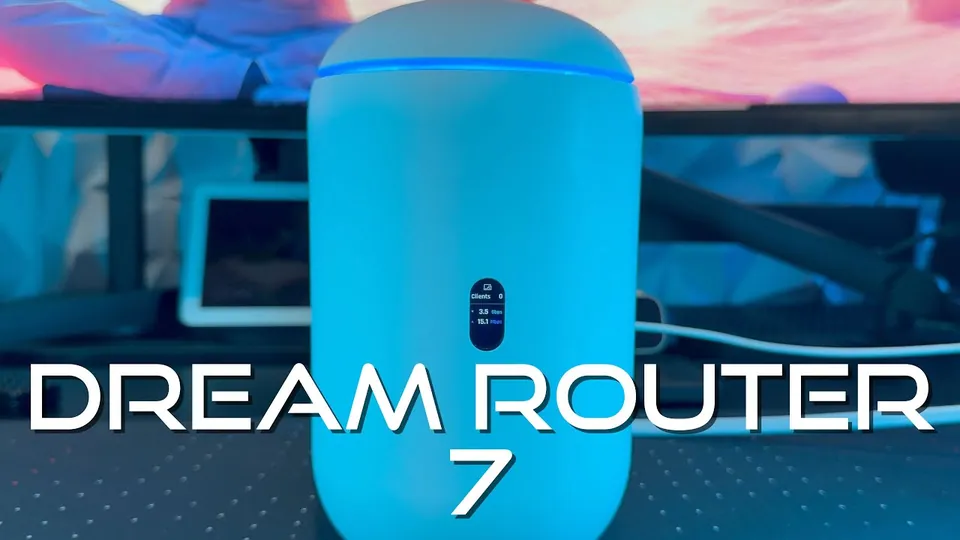
Prefer to watch? The full video is right here. 7:55 · Watch on YouTube
Jump to a section in the video
Ports and hardware
The back looks a little different now. Every switch port is 2.5 GbE, there's only one PoE port (the first one, up top) and there's a brand new 10G SFP+ port. The SFP+ port is mapped to WAN, but you can remap it to LAN to send a 10 gigabit connection downstream over a DAC cable.
The SD card slot moved below the SFP+ port, and it comes with a 64 GB Western Digital Purple card, which is rated for work like running UniFi Protect with a handful of cameras. Power is on the bottom along with the reset button, which has a nice clicky sound. On top is the Wi-Fi 7 access point, including 6 GHz.
The PoE change is the one thing I don't love. The previous generation had two PoE ports, and now there's only one. If you want to power several devices at once, plug in a switch downstream.
Dream Router 7 vs the original
Spec changes, as stated in the video
| Original Dream Router | Dream Router 7 | |
|---|---|---|
| RAM | 2 GB | 3 GB |
| Processor | Dual-core ARM Cortex A53, 1.35 GHz | Quad-core, 1.5 GHz |
| Ethernet | 1 GbE | 2.5 GbE |
| SFP+ | None | 10G |
| PoE ports | 2 | 1 |
| 2.4 GHz throughput | 600 Mbps | 688 Mbps |
| 5 GHz throughput | 1.4 Gbps | 4.3 Gbps |
| 6 GHz throughput | None | 5.7 Gbps |
Both models are the same size. Wi-Fi is 4x4 MIMO across all bands on the Dream Router 7.
The flexibility of the ports is the real win. You can use the SFP+ port for WAN and remap the WAN Ethernet port into the switch, or flip it around and use the SFP+ for a 10 gigabit link to a NAS while your internet stays on a 2.5 GbE port.
Apps and who it's for
What I've always loved about this form factor is that you choose the apps you run. You can technically run three, and with Network, Protect and Talk, most small offices don't need much else unless they want signage or access control.
I had it running with the new G3 Touch Pro phone and its wireless handset. That's the use case I keep coming back to: someone working from home who wants a dedicated, reliable, controllable connection instead of whatever their internet provider gives them. I've already sent these out pre-configured to some of my clients. They plug it in, I walk them through a couple of things, and they have phone, Wi-Fi and network, all managed remotely by me.
For cameras, you can plug a wired camera into the PoE port, use a Wi-Fi camera like the G4 Instant, or connect a Device Bridge wirelessly and power a PoE camera from there. If you just need more Wi-Fi, run a long cable to the other end of the office and plug in another AP.
“It's a very easy to set up, simple to use system for somebody who is not necessarily so tech-savvy and just wants a system that they can plug in and have it work.”
Wi-Fi speed test
I ran WiFiman on my Pixel 9 Pro Fold over Wi-Fi. Latency was 9 ms. The first run hit 1,772 Mbps down and 1,370 Mbps up. Later runs bounced around 1,400 to 1,800, and I settled on calling it about 1,400 up and down over Wi-Fi. I'm very happy with that.
My one request
Ubiquiti once teased an image of a transparent version of this router on its website. Ubiquiti, please make it. I love transparent tech, and even after I retired it, it would sit on the shelf as a museum piece.
Bottom line
The Dream Router 7 was $299 at launch, and I expect it to sell like hotcakes. The interface is the same as any other UniFi gateway, and the hardware finally matches the rest of the lineup. If you need an all-in-one router for a small office, home office or mobile setup, this is it. Just add a PoE switch if you plan to power more than one device.
Gear in this story
- Phone G3 Touch ProSpecs and compare for Phone G3 Touch ProUbiquiti Store (opens in a new tab)
- G3 Wireless HandsetSpecs and compare for G3 Wireless HandsetUbiquiti Store (opens in a new tab)
- UniFi Device BridgeSpecs and compare for UniFi Device BridgeUbiquiti Store (opens in a new tab)
- UniFi Express 7 (UX7)Specs and compare for UniFi Express 7 (UX7)Ubiquiti Store (opens in a new tab)
- Dream Router 7Specs and compare for Dream Router 7Ubiquiti Store (opens in a new tab)
- Camera G4 InstantSpecs and compare for Camera G4 InstantUbiquiti Store (opens in a new tab)
- Cloud Gateway FiberSpecs and compare for Cloud Gateway FiberUbiquiti Store (opens in a new tab)
- UniFi Cloud Gateway MaxSpecs and compare for UniFi Cloud Gateway MaxUbiquiti Store (opens in a new tab)
- UniFi Cloud Gateway UltraSpecs and compare for UniFi Cloud Gateway UltraUbiquiti Store (opens in a new tab)
Ubiquiti Store links are affiliate links. If you buy through them, the channel may get a small commission at no extra cost to you. Affiliate disclosure
Related stories

UniFi AI Port: adding face and plate recognition to older cameras
Dec 12, 2024 · 4 min read

UniFi Device Bridge IoT review: a $49 fix for wired-only devices
Nov 20, 2025 · 3 min read
How to connect Starlink V5 directly to a UniFi network, no router needed
Aug 3, 2026 · 4 min read
Jesse Nowlin
Founder of TABGEEKS, former IT Director and Google Developer Expert. I test networking and pro tech on real job sites, then write up what I find.
Join the community