

Home / Stories / AI at work
Google Cloud Next 2025: the biggest Google Workspace AI updates
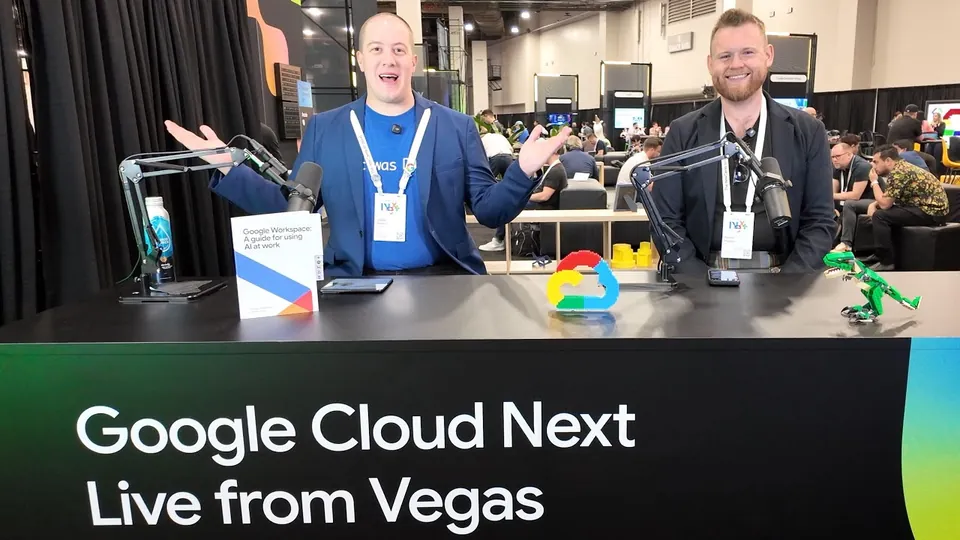
Live from the show floor in Las Vegas, I broke down the Google Workspace announcements with Rowan Manson from Cobry: Flows, Veo 2 in Vids, smarter Meet, audio in Docs and a new data assistant in Sheets.

Jesse Nowlin
Founder, TABGEEKS · · 4 min read
I'm live from the show floor at Google Cloud Next 2025 in Las Vegas with the biggest Google Workspace updates. Joining me is Rowan Manson from Cobry, the Scottish Workspace partner, wearing a custom tartan kilt in Cobry's colors.
I only made it to one session before we sat down, the Workspace spotlight, but between that and the keynote, there was plenty. Flows, Veo 2 in Google Vids, smarter Meet recaps, audio overviews in Docs and a relaunched Explore in Sheets. And the theme this year was that it is all a lot more grounded in reality.
Prefer to watch? The full video is right here. 18:51 · Watch on YouTube
Jump to a section in the video
Flows: automation for every Workspace user
The biggest one is Flows. It was first announced last year, I believe as Workflows at I/O, and it has been reworked since. You use action or time-based triggers to automate a series of steps, a lot like if this then that. On top of that, you can add a Gemini prompt to generate fresh content as part of the flow.
This is getting us to having an assistant that actually does stuff for us, which is what the promise of AI has always been. It is a practical example of the agent idea that any end user in a company can deploy.
We asked the product manager in a demo about the overlap with Agentspace. The answer: Agentspace is more GCP geared, maybe for larger enterprises, while Flows is meant for everyone, across any company size or department.
AI as a force multiplier
There is a lot of talk about AI taking jobs, and from everyone I've talked to, the opposite is true. Google has been sharing a stat that 30% of the code it generated this year was written by AI. They didn't let anybody go. They shipped 30% more code.
Rowan pointed to the event at the Sphere, which left me speechless. The film started in its original frame, then slowly zoomed out to fill the whole Sphere, and there was an audible gasp from the crowd. That project created a huge amount of human work alongside AI that wouldn't have existed otherwise.
Most of us, asked how we're doing, say "busy." Busy with email threads that grow endlessly because every client appends everyone's signature. Imagine saving 20% or even 50% of that time.
“It's like an intern, but it's getting finally to the point where it's not as dumb as an untrained intern.”
Meet gets a meeting assistant
Rowan noticed that Google's AI is becoming more collaborative, more of a two-way conversation, as in Canvas and NotebookLM. In Google Meet, a meeting assistant can recap what was said if you weren't in the call, with more helpful follow-up summaries and action items.
I don't start a meeting without Take notes for me turned on. A year ago it was janky, and it still loses track of who is speaking when several people share one connection, but it keeps getting better.
Google Vids with Veo 2
Rowan thinks 2025 is the year most companies see the value of video, internally and externally, for things like training. Veo 2 in Google Vids lets anyone in a company produce video without specialized tools, with a new level of polish.
Neither of us used Vids much last year. As a Google Developer Expert, I've had access for almost a year. At first it was basically slides as video, and every couple of months something new appeared. With Veo inside, I'll use it regularly. It is the simplest, fastest way to get a beautiful AI generated video, and I could even use it for B-roll.
Docs: audio overviews and built-in refinement
NotebookLM's audio overviews, with two hosts discussing your content, are coming directly into Google Docs. You can generate a read-through of a document or a podcast-style conversation. Not everyone learns well from reading. Video at 2x is how I learn best, and more formats make a real difference, especially for students.
Docs is also getting the Gemini refinement you used to do in the app, built right in, suggesting ways to strengthen a paragraph or adjust tone as you write.
Sheets: Explore returns as a data assistant
Explore has been one of my favorite Workspace features for ages. It was one of the first natural language AI features in a productivity tool. It is coming back as more of a data assistant. You ask questions in plain language and get insights you might not have uncovered.
Picture an analyst who builds a spreadsheet and sends it off. Instead of coming back with questions, the boss or another team asks Gemini, which answers from that data. It is fast, simple and self-serve.
Bottom line
What I took away most is that this year was grounded in reality. Features are available today, next week or this quarter, not maybe, and I was told the developer keynote demos were 100% live. A year ago, that wasn't the case. Google's strength is making technology easy to use, and this is a year when everyone in a company will need to get involved with AI or risk getting left behind.
“This is Google strength, right? They don't make clunky technology.”
Related stories
Shadow IT on steroids: how to govern AI agents at work
Oct 7, 2026 · 7 min read
Your IT stack is bloated: how to simplify and secure it for 2026, with Promevo's Colin McCarthy
Dec 2, 2025 · 7 min read
What is Meta Muse? A week with Meta's new personal AI agent
Sep 23, 2026 · 6 min read
Jesse Nowlin
Founder of TABGEEKS, former IT Director and Google Developer Expert. I test networking and pro tech on real job sites, then write up what I find.
Join the community